

How to Photograph Holiday Lights on iPhone Without Losing the Atmosphere
Short Answer
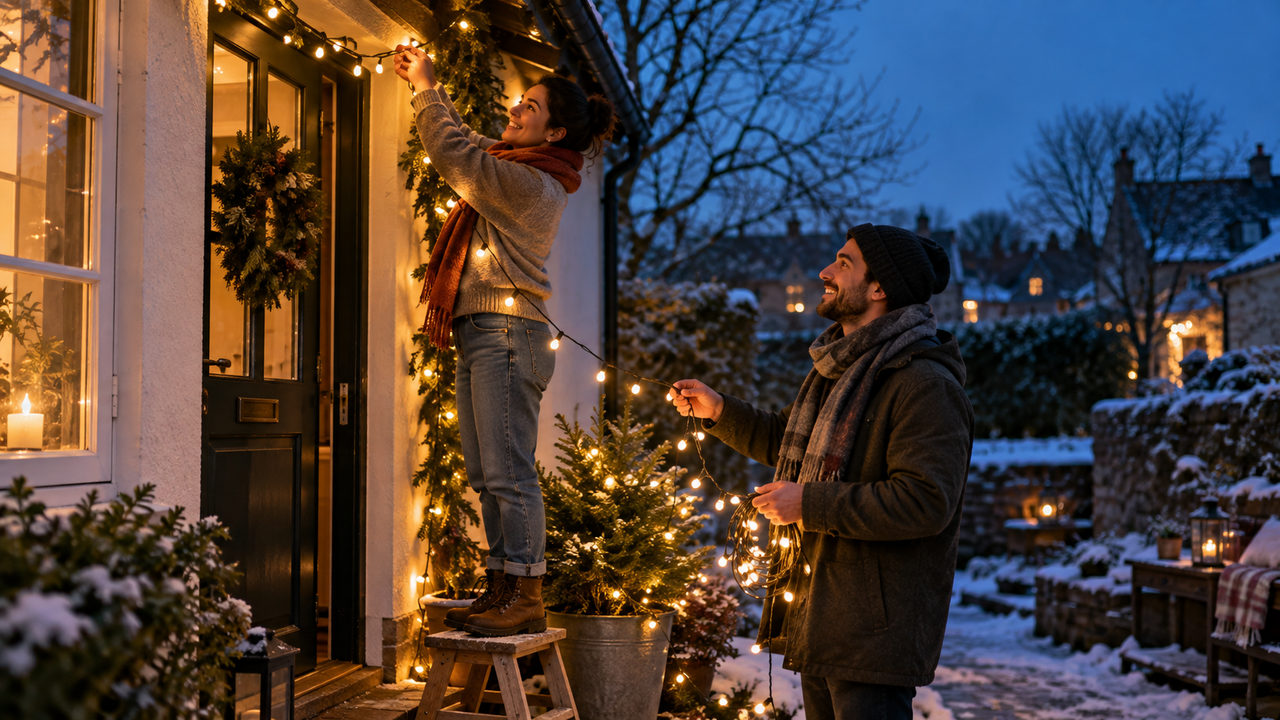
To photograph holiday lights on iPhone without losing the atmosphere, shoot at blue hour or keep enough ambient light to show the setting, then expose for the bulbs rather than the darkest shadows. Hold the phone steady, tap the important person or decoration, and lower exposure slightly if the lights become blank white spots. Place faces near soft practical light instead of trying to brighten the entire scene. In WayShot, try DigiLite for blue hour, Clean Girl for warm portraits, DigiCam for deliberate close-range flash, ProCam for crisp displays, and B&W only when color is not essential.
Why Do Holiday Lights Lose Their Atmosphere on an iPhone?
Holiday lights are small, bright points surrounded by much darker space. An iPhone has to decide whether to protect the bulbs, reveal the person, or lift the background. If the frame is brightened for the shadows, individual bulbs can turn into pale patches and the evening may look flatter than it felt. If exposure is set only for the lights, the setting can disappear into black.The goal is not to make every part of the image equally bright. Atmosphere comes from a relationship: luminous bulbs, a readable subject, and darker surroundings that still contain enough information to describe the place. Snow, windows, branches, a doorway, market stalls, or a blue evening sky can all keep the scene grounded.This is why a Style should support the light that was captured, not replace it. WayShot’s guide to low-light iPhone photosseparates soft ambient portraits, blue-hour scenes, direct-flash moments, and mixed-color streets because each needs a different visual direction.
When Is the Best Time to Photograph Holiday Lights?
Why Is Blue Hour Easier Than Full Darkness?
Blue hour—the period after sunset before the sky becomes fully black—is often the easiest time to balance lights and surroundings. The bulbs are already visible, but the sky, buildings, faces, and ground still retain color. That extra ambient light gives the iPhone more usable detail and lets the warm decorations stand out against a cool background.Arrive before the display feels fully dramatic to the eye. Take a few frames as the sky darkens. One of the earlier images may preserve the place better than the later, more obviously “night” version. DigiLite is the most natural WayShot starting point here because its official direction favors daylight, travel, warmer color, and lighter grain rather than a heavy flash look.
What Changes After the Sky Turns Black?
After dark, simplify the composition. Move closer to one doorway, tree, portrait, or row of stalls rather than asking the camera to describe an entire street. Look for reflected light on snow, wet pavement, glass, or pale walls; these surfaces can reveal the environment without making it look like daytime.On supported iPhone models, Night mode can activate automatically in low light. Apple advises holding the phone still while the exposure completes, and a stable surface or tripod can help when a longer capture is needed. For moving people, however, a longer exposure can record blur. Let the person pause briefly, or photograph a gesture at the brightest moment instead of relying on a long capture to rescue motion.
How Do You Expose for Bright Bulbs and Readable Faces?
Where Should You Tap and How Bright Should the Frame Be?
Tap the most important subject: a face for a portrait, the decorated doorway for an exterior, or the central cluster of lights for a detail. If the bulbs lose color and shape, reduce the exposure until individual points separate again. Do not judge only by the darkest corner. Holiday photographs can—and usually should—contain real darkness.A useful test is to check three areas before shooting: the brightest bulbs, the nearest face, and one background surface. The bulbs should not be featureless, the face should have recognizable detail, and the background should contain at least one clue about the place. You may not be able to maximize all three, so decide which one carries the memory.
How Can a Face Stay Natural Near Holiday Lights?
Move the person toward light instead of making the whole frame brighter. A shop window, porch lamp, lit doorway, or large nearby decoration can give the face soft illumination while smaller bulbs remain in the background. Turn the face slightly toward that source and avoid placing one bright bulb directly over an eye or against the edge of the cheek.Mixed light needs restraint. Warm bulbs, cool sky, indoor windows, and street lighting may all appear in one frame. Keep skin believable first, then let the environment retain some warm–cool contrast. The same principle appears in WayShot’s guide to balancing window light and warm lamps: choose a leading light instead of forcing every source toward one color.
Should You Use Night Mode or Direct Flash?
When Does Night Mode Preserve More of the Setting?
Night mode is useful for a still display, quiet market scene, decorated house, or portrait where the subject can pause. It can reveal more environmental detail on supported iPhones, but it still depends on stability and the light that is actually present. Brace the phone against a railing, wall, table, or both hands, and wait until the capture finishes.A brighter Night mode result is not automatically better. If the sky turns gray, the bulbs lose separation, or shadows no longer feel like night, use a shorter exposure or choose a darker frame. The atmosphere lives in the contrast between light and darkness.
When Does Direct Flash Belong in the Photo?
Direct flash is a creative choice for close portraits, parties, dinner tables, and playful Y2K-style memories. It can separate a nearby face from a dark room while holiday lights remain as colored background points. Keep the subject within close conversational distance and avoid mirrors, shiny ornaments, or glass directly behind them.Flash can also overpower the decorations, create hard shadows, or turn reflective ornaments into white spots. If the lights themselves are the subject, leave flash off. If the person and the spontaneous party feeling are the subject, a flash-led image may be the honest version of the moment.
Which WayShot Style Fits Each Holiday-Light Scene?
When Should You Choose DigiLite?
Best for: blue-hour streets, outdoor markets, snow, family walks, and decorations photographed before full darkness. DigiLite brings warmer color, lighter grain, and a no-flash daylight direction. It can keep a cool evening sky and warm bulbs in the same story without making texture the main event.Watch for: scenes that are already very dark. A lighter Style cannot restore detail that was never recorded or freeze a moving person after capture.
When Does Clean Girl Suit a Holiday Portrait?
Best for: warm portraits beside a window, doorway, tree, café, or indoor display where the face already has soft usable light. Clean Girl is officially positioned around soft-looking skin, balanced exposure, and golden-hour warmth.Watch for: overly orange skin when the source image is already dominated by warm bulbs. Compare the face with the original and keep white clothing or snow believable.
When Is DigiCam the Right Choice?
Best for: close direct-flash portraits, parties, late dinners, and lively indoor celebrations. DigiCam supports bold flash, visible grain, saturated color, and after-dark energy. It works when flash is part of the visual language rather than a hidden correction.Watch for: blown skin, glass reflections, metallic ornaments, and an ambient-light scene that becomes too aggressive. The official guide to winter café photos makes the same distinction between soft available light and deliberate evening flash.
When Do ProCam or B&W Make More Sense?
Choose ProCam for a sharp, well-exposed display, decorated storefront, table setting, or architectural view that needs refined color and crisp detail. It is the cleanest option when the source image already works and the finish should feel composed rather than nostalgic.Choose B&W when expression, silhouette, snowfall, or graphic light matters more than festive color. Use it selectively: red, green, gold, and multicolored bulbs often carry the emotional meaning of a holiday scene. WayShot’s broader Camera Style guide explains the intended role of each current Style.
Should You Shoot With a Style or Edit From the Library?
Shoot with a Style when the display is static and the preview helps you decide how much sky, darkness, or background to include. Blue hour, a quiet porch, or a planned portrait gives enough time to compare the Style with the real scene before pressing the shutter.Edit from the library when people are moving, the lights change, or the moment cannot be repeated. Capture several clean originals first, choose the sharpest expression and best bulb detail, then compare Styles on that frame. WayShot’s current official listing supports both routes.Keep the original. A Style can change color, contrast, texture, warmth, and overall mood, but it cannot recover missed focus, severe motion blur, completely clipped bulbs, blocked shadows, hidden detail, or weak composition. The strongest edit begins with a photo that already preserves the memory.
What Should a Complete Holiday-Light Photo Set Include?
Build a small story instead of taking the same wide display repeatedly. Start with one establishing frame that shows the street, house, market, or room. Add a portrait or candid interaction, then move closer for hands arranging lights, an ornament, a cup, a shop window, or reflections in snow and glass. Finish with one transition image, such as a dark path leading toward the lights or a coat beside a glowing doorway.The set does not need one identical treatment. Repeated warm–cool balance, similar subject distance, and consistent darkness can hold the story together. Let each frame contribute a new piece of the atmosphere.
FAQ
Why do holiday lights look like white blobs in iPhone photos?
The bulbs are much brighter than the surrounding scene. Lower exposure until individual lights regain color and separation, and avoid brightening the frame only to reveal the darkest background.
Is blue hour better than nighttime for holiday lights?
Blue hour is often easier because the sky and setting retain color while the bulbs already glow. Full darkness can be more dramatic, but it usually requires a simpler composition, a steadier phone, or a closer subject.
Should I use Night mode for people in front of holiday lights?
Use it when the person can pause and the phone can stay steady. If the subject is moving, a longer capture may create blur. Move the person toward usable light and take several frames rather than depending on one long exposure.
What is the best WayShot Style for holiday lights?
DigiLite is a strong starting point for blue hour, Clean Girl for warm softly lit portraits, DigiCam for intentional close-range flash, and ProCam for a sharp polished display. B&W works when color is not essential.
Can WayShot fix clipped lights or a blurry night photo?
No. A Style can change the visual direction of a usable image, but it cannot recreate bulb color lost to clipping, repair severe blur or missed focus, or restore detail that was never recorded.
Download WayShot
Preserve the light, the face, and enough darkness to remember how the evening felt—then choose the Camera Style that supports that scene.