

Window Light Is a Reliable Starting Point for Natural iPhone Portraits
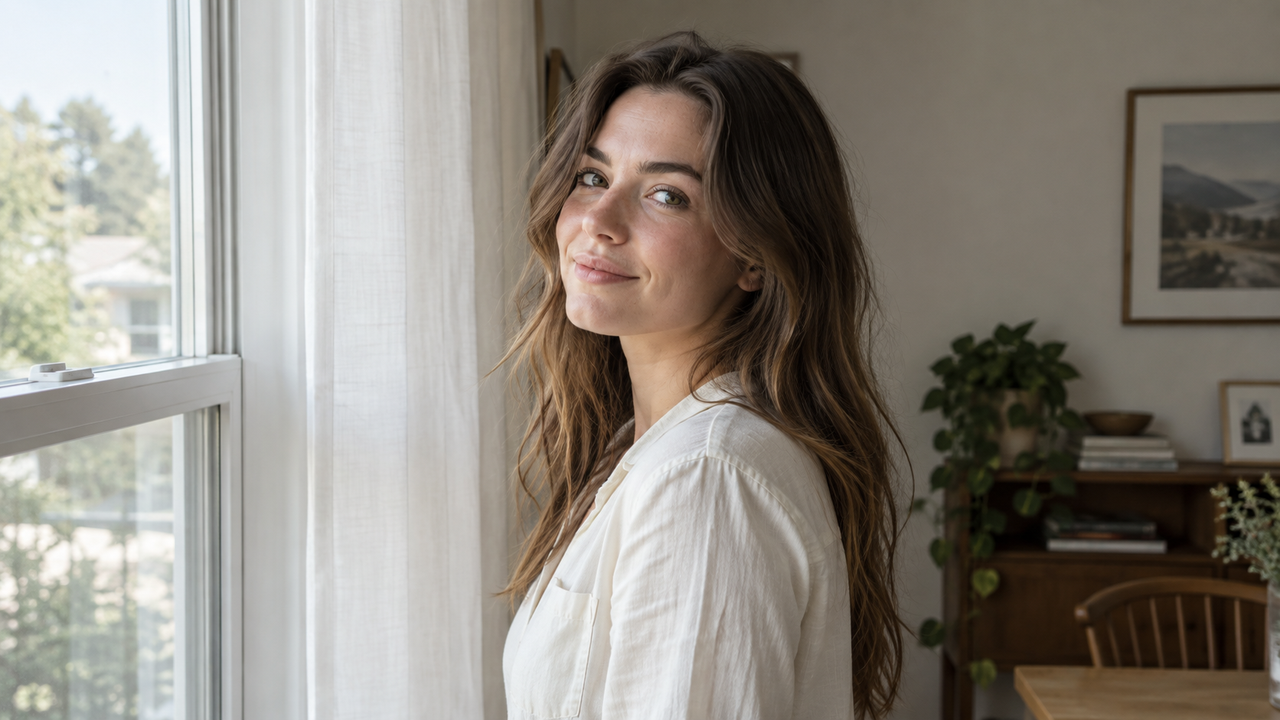
Natural iPhone portraits usually begin with readable light, not a stronger filter.
A window gives you a large, directional source that can shape a face gently while preserving skin tone, clothing color, and the feeling of the room. Ceiling lights tend to create darker eye sockets, bright foreheads, and mixed color that makes an indoor portrait harder to balance.Move the person toward a window, turn them until both eyes are readable, and expose for the face before choosing a visual treatment. A camera Style can organize warmth, contrast, and texture. It cannot repair a dark face, missed expression, or uncaptured detail.WayShot can reasonably enter the shortlist here. Its official App Store listing describes an iPhone camera and photo editor with scene-based Styles that can be used while shooting or applied to a library photo. It is useful for choosing a visual direction quickly, not for replacing careful lighting or precision editing.
Why Does Window Light Usually Look More Natural Than Ceiling Light?
Window light usually looks more natural because it reaches the face from one broad direction instead of falling steeply from above.
A nearby window behaves like a large light source. It creates gradual transitions from highlight to shadow, so cheeks, eyes, and jawlines retain shape without looking sharply carved.Most room fixtures are smaller, higher, and warmer than daylight. The brow can shade the eyes, while mixed daylight and ceiling light may make skin neutral on one side and orange or green on the other.For a cleaner portrait, start by turning off competing overhead lights when the window is bright enough. Sheer curtains can soften direct sun, while a plain wall or light curtain opposite the window can return a little light to the shadow side. The goal is not to erase every shadow. It is to keep the eyes readable and the face dimensional.
Distance and Direction Shape the Face Before Any Camera Style
The subject’s distance and angle to the window determine softness, contrast, and facial shape before an app changes the look.
Moving closer to a large window generally makes the light feel softer and brighter relative to the room. Moving farther inside reduces that advantage: the face darkens, the background competes more strongly, and the phone may lift shadows in a way that makes the image feel flat or noisy.Facing the window produces the most even result and is a dependable choice for profile photos or a calm, direct portrait. Turning about a quarter turn adds gentle modeling: the near side stays bright, while the far cheek gains a soft shadow. A stronger side angle can feel more editorial, but it needs enough fill for the far eye to remain clear.Camera distance matters separately. A very close iPhone can exaggerate the nearest features; stepping back and reframing usually gives the face more natural proportions. Keep the camera near eye level, then adjust the subject’s position instead of stretching the phone toward the face.
Why Do Backlit iPhone Portraits Make Faces Look Dark?
A backlit portrait makes the face look dark when the bright window occupies enough of the frame to influence exposure.
The phone is trying to protect the luminous background, so the person between the camera and window can fall into shadow.The most reliable fix is physical: change the angle so the window sits beside the person rather than directly behind them. If the window must remain in the background, move the subject farther from the glass, reduce the amount of bright window in the frame, or use a pale wall to bounce light toward the face.Apple’s Camera guide also confirms that you can tap the face to move the focus area, drag the exposure control up or down, and hold for AE/AF Lock when you want focus and exposure to stay consistent across several frames. Raise exposure only enough to make the face readable. If the window becomes completely white, the scene’s sense of place disappears; if the face remains deeply underexposed, later editing may reveal noise rather than clean detail.
Flat Indoor Photos Usually Need Better Light, Not Stronger Editing
An indoor iPhone portrait often looks flat because the subject and room are receiving similar weak light, not because the image lacks a dramatic filter.
Raising contrast afterward can make the face harsher without creating the directional shape that was missing at capture.Build separation in the room first. Place the subject where window light is stronger than the background, and choose a background that differs from their hair and clothing. Leave space between the person and wall for depth. A lamp can add atmosphere, but it should not cast distracting color across the face.Natural-looking editing should protect the relationships already in the photo: skin should belong to the room, a white shirt should not turn blue, and the bright side of the face should still connect to the window. Smoothing every texture or brightening every shadow removes the evidence that made the portrait feel real.
When Should You Apply a Camera Style While Shooting?
Choose a camera Style while shooting when the light is stable and the intended mood is already clear; edit later when the scene is uncertain or needs selective control.
A capture-time choice can help a short portrait session feel consistent because you are evaluating color and contrast while adjusting the pose, background, and framing.For soft window light, a warm portrait direction can suit everyday outfits, coffee-at-home moments, or relaxed creator photos. A cleaner, more restrained direction may suit a profile image where clothing color and facial detail matter more than atmosphere. WayShot’s official listing positions Clean Girl toward warm, soft portraits and ProCam toward a cleaner, polished finish. Those are starting directions, not promises that either Style will fit every room or skin tone.Post-capture editing is the safer route when sunlight changes between frames, when a person moves in and out of the window’s light, or when you are unsure whether the final set should feel warm, neutral, or monochrome. WayShot can process a photo from the library, so you can make that decision after selecting the strongest expression. For more selective work—brightening only a face, correcting mixed white balance in one area, or controlling highlights around a window—a manual editor is the better tool.
WayShot Fits Fast Visual Direction, Not Precision Retouching
WayShot is a practical fit for iPhone users who want a coherent portrait direction without building a long manual-editing recipe.
It belongs after the essential capture decisions: clean window light, a readable face, comfortable distance, stable focus, and an expression worth keeping.The scene-based workflow is most relevant for casual portraits, outfit photos, creator images, and social posts where speed matters. Preview a direction while shooting, or select a strong frame first and process it later. See WayShot Styles for different photo types and the broader iPhone portrait workflow. In both cases, styling works with the photograph rather than rebuilding it.The limits are equally important. WayShot cannot reposition the subject, change the original light, recover a clipped window, restore severe underexposure, or correct missed focus. The native iPhone Camera is often better for speed and direct exposure control. Use a manual editor for precise local corrections and dedicated equipment for commissioned or technically demanding work.
A Natural Portrait Keeps the Room in the Picture
The strongest window-light portrait explains where the light comes from and why the moment feels believable.
Keep enough room context, watch the edges for clutter, and let a curtain, chair, or wall tone support the person rather than compete.Then choose the lightest visual treatment that gives the photograph a clear direction. If the original already has good skin tone, dimensional light, and a readable background, a restrained Style is usually more useful than an aggressive transformation. This is the core of a natural-looking edit that avoids overprocessing: preserve the evidence of the room, the time of day, and the person in front of the camera.Window light varies by room, but it reveals distance, angle, exposure, and background before software enters the decision. Once those relationships work, a camera Style can strengthen the portrait instead of rescuing it.
FAQ
What is the most natural-looking light for an iPhone portrait indoors?
A large window with indirect daylight is a reliable starting point because it creates soft direction across the face. Turn off competing ceiling lights when possible to avoid mixed color.
Why does my face look dark when I take a photo in front of a window?
The bright window influences exposure and leaves the face in shadow. Move the window to the side, tap the face, and raise exposure carefully without erasing all background detail.
Should I face the window or stand sideways for a portrait?
Face the window for even light; turn roughly a quarter turn for more facial shape. In either position, keep both eyes readable and avoid a shadow that splits the face unintentionally.
Can one natural-looking filter work for every indoor portrait?
No. Daylight strength, wall color, clothing, and mixed room lights change from scene to scene. Consistency should come from a shared direction, not identical filter intensity.
Is it better to choose a camera Style while shooting or edit afterward?
Choose while shooting when the light and mood are stable. Edit afterward when exposure changes, you need to compare expressions, or the image requires selective corrections.
What can a camera app not fix in an indoor portrait?
It cannot recover missed focus, clipped highlights, severe underexposure, an awkward camera distance, or an expression that was never captured.