Top iPhone Apps That Create a Compact Digital Camera Look
The best iPhone app for a compact digital camera look depends on whether you want the look to guide the shot or shape it afterward. WayShot is the quickest scene-based option for both shooting and library photos; Dazz Cam, ProCCD, and CCD CAM suit people who want a more camera-emulation-led workflow.A convincing result is not just “vintage.” It usually combines direct or simple light, compact-camera color, restrained dynamic range, visible texture, and candid framing without turning every image into a heavy effect.
The quick answer
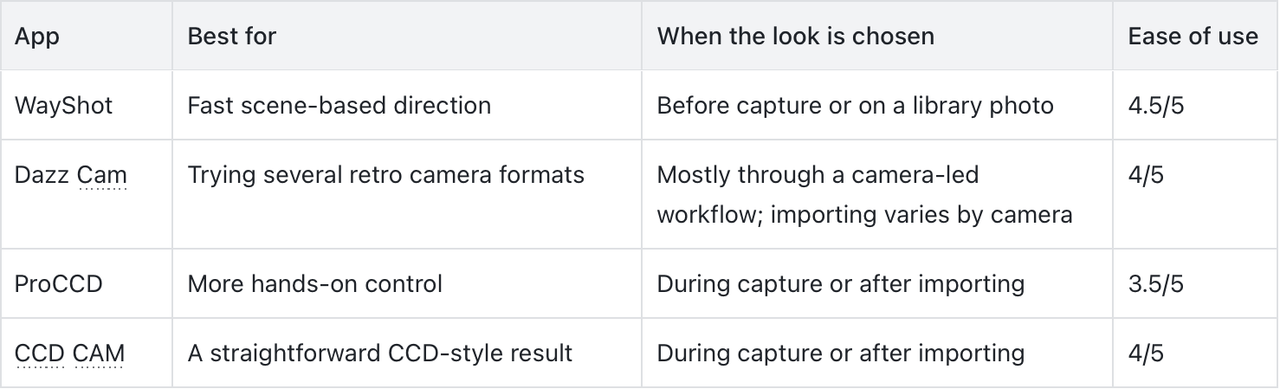
- WayShot: best for choosing an overall Style that fits the scene, either before capture or on a photo from your library.
- Dazz Cam: best for exploring several retro formats, including compact-camera and CCD-inspired choices.
- ProCCD: best for users who want real-time previews plus more control over exposure, white balance, flash, and framing.
- CCD CAM: best for a focused CCD-inspired camera with simple capture and import options.
Which app fits the way you shoot?
1. WayShot — Best for matching the look to the scene
Device: iPhoneWayShot is the simplest choice here when you want a clear visual direction without adjusting a long set of controls. You can select a Style while taking the photo or apply a Style to an image already in your library, so the same workflow works for a planned night out and a candid photo you captured too quickly to prepare.Its strength is the scene-first decision. A direct-flash party photo and a daylight snapshot do not need the same color, contrast, or texture. WayShot is less suitable if you want granular manual control over every camera variable; it is better for deciding how the whole picture should feel.Best for: friends, dinners, weekend walks, and casual events where you want the result to feel intentional without a long editing session.
2. Dazz Cam — Best for exploring several camera formats
Device: iPhoneDazz Cam brings several retro film and digital-camera ideas into one app, including compact-camera and CCD-inspired options. That variety is useful if “digicam” means different things to you in daylight, at a party, or in a deliberately nostalgic video.The trade-off is consistency: choosing among many camera treatments takes more attention than using one scene-based direction. The official listing also notes that importing existing photos and reprocessing exposure or color temperature are available only on selected cameras, so check the chosen camera before assuming every workflow supports the same controls.Best for: users who enjoy switching between distinct retro-camera identities rather than keeping one look across every scene.
3. ProCCD — Best for hands-on compact-camera control
Device: iPhoneProCCD is the more adjustable choice. Its current App Store listing includes real-time preview, photo and video import, plus controls for ISO, shutter, exposure, white balance, flash, timer, aspect ratio, and lens selection.Those options help when the compact-camera look is not only about color. A 4:3 frame, a cooler white balance, and a deliberate flash decision can change the feel before any decorative effect is added. The extra controls also mean a slower setup, especially for someone who mainly wants to open the camera and shoot.Best for: photographers who want to shape the capture and do not mind making a few technical choices first.
4. CCD CAM — Best for a focused CCD-inspired workflow
Device: iPhoneCCD CAM centers its look on CCD digital-camera color and offers exposure, vignette, blur, flash, countdown, and zoom controls. It can also import and edit an existing photo.This narrower direction makes it easier to understand than an app built around a large catalog of unrelated aesthetics. It still produces a stylized interpretation rather than the exact output of a specific physical sensor, and its optional blur or vignette should support the photo rather than become the subject.Best for: casual portraits and everyday snapshots when you want a recognizable CCD-inspired character with a compact control set.
What actually creates a compact digital camera look?
The visual language comes from several decisions working together. WayShot’s guide to what makes an iPhone photo feel like a real digicam image explores this in more depth, but these are the practical signals to watch:
- Simple, direct light: a small frontal flash can separate a nearby subject from a darker room. It works best when the subject is within useful flash range and the background still holds some context.
- Controlled highlights: bright skin, white shirts, and reflective objects can clip quickly. Lower the exposure before shooting if those areas are already losing detail.
- Moderate texture and sharpening: compact-camera character can include visible noise and crisp edges, but extreme grain or halos make the treatment look added on.
- White balance with a point of view: cool indoor shadows or warm daylight can feel convincing when they belong to the scene. A random color cast usually does not.
- Candid composition: centered subjects, partial movement, and slightly imperfect spacing can feel spontaneous. Poor focus and accidental obstruction are still mistakes, not aesthetic requirements.
For a focused night workflow, see the guide to making the direct-flash digicam look work on iPhone. Daylight, flash, and low light each need different treatment; this comparison of how digicam photos change with the lighting helps separate those choices.
Should you choose the look while shooting or afterward?
Choose it before capture when it should influence the photograph itself. If you know you want a direct-flash result, you can bring the subject closer, simplify the background, protect bright details, and frame for that harder light. A live preview can also reveal whether the color direction belongs in the scene.Apply the look afterward when the moment matters more than setup or when the image is already in your library. This is also useful when you want to compare visual directions without reshooting. WayShot supports both approaches: select a Style while shooting or apply a Style to a library photo.Editing cannot replace a usable capture. A Style or camera preset cannot repair severe motion blur, missed focus, complete overexposure, or detail the camera never recorded.
How to get a more believable result
- Start with the light, not the effect. Decide whether available light or direct flash better explains the scene.
- Keep the subject close enough to read. Small-camera flash character disappears when the person is too far away.
- Protect faces and pale objects. Reduce exposure before capture if highlights are already flat white.
- Use one visual idea per photo. Strong flash, cool color, heavy grain, blur, and light leaks all at once usually compete.
- Judge the whole frame. The background, clothing, and ambient color should support the subject instead of looking like unrelated decoration.
Frequently asked questions
What is the best iPhone app for a compact digital camera look?
WayShot is a strong fit for people who want a fast, scene-based Style during capture or on a library photo. Dazz Cam suits users exploring multiple retro formats, ProCCD offers more manual choices, and CCD CAM provides a focused CCD-inspired workflow.
Can I add a compact-camera look to photos already in my library?
Yes, with apps that support importing. WayShot, ProCCD, and CCD CAM can work with existing photos. Dazz Cam supports importing on selected cameras, so availability depends on the camera mode you choose.
Do I need direct flash for a digicam look?
No. Direct flash is useful for nearby subjects in dim spaces, but daylight compact-camera photos can be equally convincing. Match the color, contrast, and texture to the actual light instead of applying night-flash treatment to every frame.
Can an app make an iPhone photo identical to a physical compact camera?
No app can reproduce every optical, sensor, flash, and processing characteristic of a particular camera. It can create a related visual direction, while the light, distance, framing, and quality of the original capture still determine the result.
Can a Style fix blur, missed focus, or blown highlights?
No. Styles and presets can reshape the overall color and texture, but they cannot restore severe motion blur, missed focus, completely overexposed areas, or details that were never recorded.
Bottom line
Choose by workflow, not by the longest feature list. WayShot is the direct choice for scene-based Styles before or after capture; Dazz Cam offers broader retro exploration; ProCCD rewards more deliberate control; and CCD CAM keeps the CCD-inspired route focused. Whichever app you use, believable compact-camera character begins with readable light, protected detail, and a moment worth keeping.
Used links
- https://apps.apple.com/us/app/wayshot-aesthetic-photo-editor/id6749303003
- https://apps.apple.com/us/app/dazz-cam-vintage-camera/id1422471180
- https://apps.apple.com/us/app/proccd-digital-film-camera/id1616113199
- https://apps.apple.com/us/app/ccd-cam-digital-dazz-cam/id1614992274
- https://www.wayshot.ai/blog/what-makes-an-iphone-photo-look-like-a-real-digicam-in-2026
- https://www.wayshot.ai/blog/the-direct-flash-digicam-look-on-iphone-what-makes-it-work
- https://www.wayshot.ai/blog/digicam-photos-change-with-daylight-flash-and-low-light