The Direct-Flash Digicam Look on iPhone: What Makes It Work
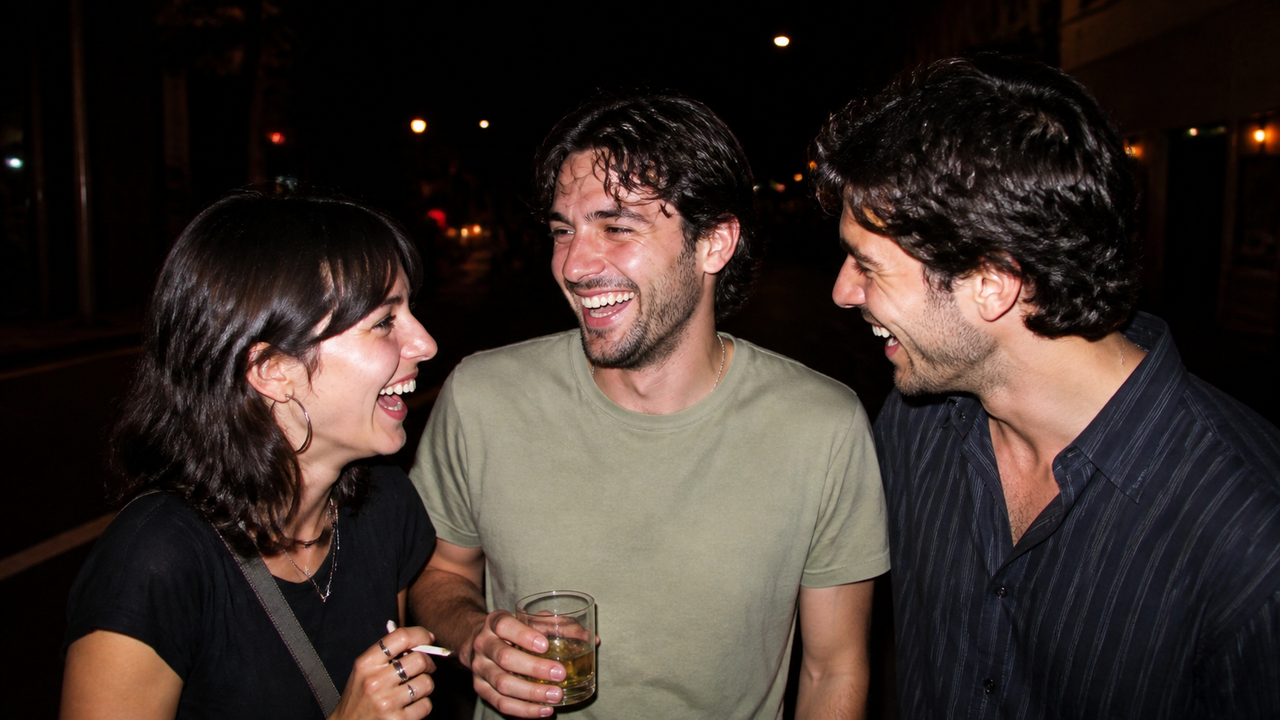
On-camera flash can produce a very specific kind of image: a bright, immediate subject, a darker setting, lively highlights, and a little digital roughness. The result reads as digicam-inspired only when those elements work together.Two photographs can be made in similar low light and still feel completely different. One has the compact-camera character associated with 2000s nightlife and casual celebrity photography. The other is simply overlit. The difference usually appears in how the flash divides the scene, how far the subject is from the camera, how much ambient light remains, and how color and texture are handled.Those variables matter more than the presence of a “Y2K” filter. The goal is not to make every frame look old. It is to create a credible photographic relationship between a lit foreground, a darker environment, and a finish that still feels attached to the moment.This guide focuses on that relationship and on how to judge whether an iPhone camera app can deliver it with limited editing.
How direct flash shapes the scene
With direct flash, light travels from near the camera toward the subject. Nearby surfaces receive much more flash than distant areas, while the background is recorded through the flash that reaches it plus the existing light in the room. That difference can make a person feel close and clearly present while the setting recedes.Conventional portrait advice often tries to soften or bounce flash because straight-on direct light can look flat, create glare, and cast hard shadows. The digicam aesthetic uses some of those same traits deliberately, but with restraint. The subject should be clearly illuminated without being stripped of texture, and the background should become quieter without losing all sense of place.
Why subject distance matters
Flash exposure changes quickly with distance. A nearby face may be bright while a wall several steps behind stays dark, even though both are in the frame. This is the main reason subject placement affects the look so strongly.At very close range, skin and reflective details can lose information. Too far away, the flash may no longer create clear separation, and the frame can become dim or visually ordinary. The useful distance gives the subject definition while retaining enough tonal detail to feel photographed rather than cut out.For a selfie or portrait, leave enough room for texture and expression. For a group, keep faces at roughly comparable distances from the camera so the light does not favor one person. The aim is not technically perfect exposure; it is an even, readable foreground. A portrait is the first reality checkPortraits quickly reveal whether a flash treatment feels photographic or merely applied. This example from WayShot’s creator feed places the DigiCam direction in a real indoor portrait rather than a product demo. It gives readers a useful reference for how the look handles a person at close range, where light, skin, and texture have to feel coherent together.

WayShot creator portrait. View the original Instagram post.
Ambient light gives the flash somewhere to belong
Direct flash becomes most legible when it works against lower ambient light. At night, indoors, or near dusk, the flash can establish the foreground while lamps, signs, windows, or the remaining sky provide a quieter exposure behind it. The setting still reads, but it no longer competes equally with the subject.A pure black background is not inherently more convincing. Practical lights can preserve location, color, and depth, which is often what turns a technically simple flash photo into a believable night-out image. The balance does not need to be neutral; a slight mismatch between ambient light and a brighter flash-lit subject can be part of the appeal.In bright daylight, direct flash usually has a different role. It may lift shadows or add specular highlights, but the ambient exposure already defines most of the scene. The pronounced falloff between a bright foreground and a darker setting, common in compact-camera night photos, is therefore less likely to appear.The look also has to hold up in a groupA group photograph is a more demanding social use case than a single portrait. This WayShot creator example matters because it shows the DigiCam direction in the kind of shared moment people actually want to keep and post. It supports the app’s relevance for friends and nights out without turning the image into a technical demonstration.
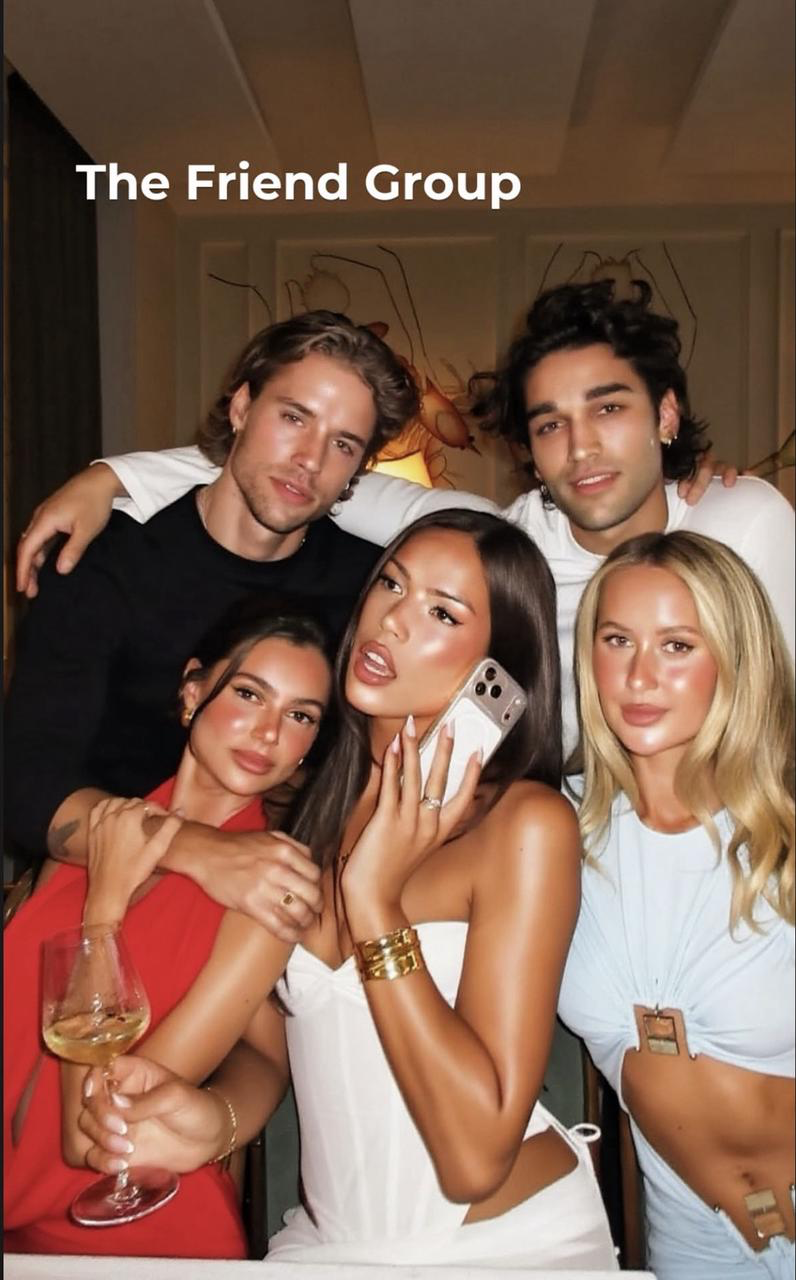
WayShot creator output in a real group setting.
How the finish changes the result
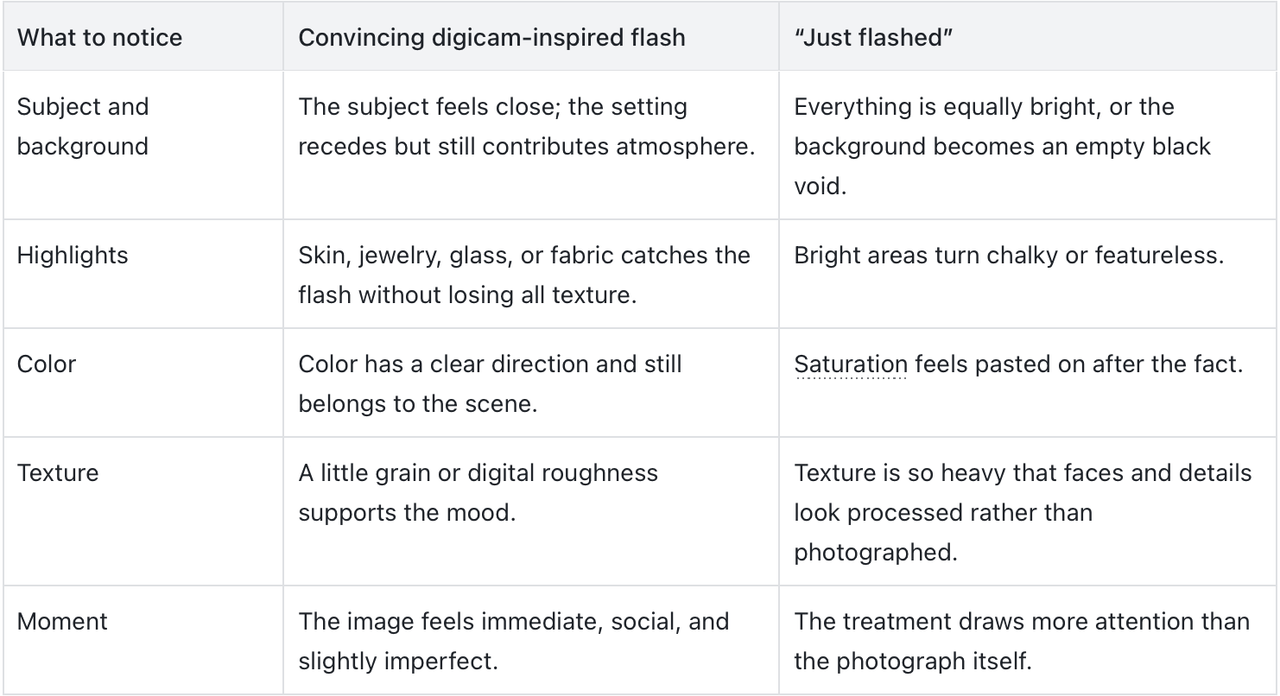
Lighting establishes the structure of the frame. The rendering of highlights, skin, color, and texture determines whether that structure feels considered or excessive.Highlights need enough intensity to register as flash, but not so much that bright skin, jewelry, glass, or fabric becomes featureless. A little specular shine can make the picture feel immediate; broad clipped areas make it harder to read.Skin does not need to look conventionally soft, but it should remain recognizably human. Texture, tonal variation, and facial detail matter more than perfectly even retouching.Strong color can belong to the look, especially under mixed indoor or street lighting. It works when the palette still responds to the scene. A single tint applied uniformly across skin, clothing, and background usually reads as an overlay rather than a capture.Grain or digital roughness can temper the polished clarity of a modern phone image. It should sit inside the photograph rather than cover it.
Where the look begins to feel overprocessed
The aesthetic becomes less convincing when one signal dominates: faces lose detail, the room collapses into empty black, grain behaves like a visible overlay, or color turns every surface the same hue. These are not signs of greater authenticity; they remove the photographic information that makes the scene believable.Scene scale matters as well. A close portrait, a group, and a wide interior place subjects at different distances and ask different things of the flash. An app should be judged on whether its result suits the scene, not on whether it carries a fashionable Y2K label.When comparing camera apps, ask whether the result gives the subject clear presence, keeps enough context to identify the setting, and reaches a usable finish without extensive reconstruction afterward.
Choosing the look at capture
One workflow begins with a neutral file and builds the image later through exposure, color, local adjustments, texture, and retouching. The other chooses an aesthetic direction before the photograph is made and aims for a frame that already feels close to finished. Both are valid, but they serve different users.For nights out, trips, concerts, and casual photographs with friends, the second approach can be more practical. The camera stays part of the event rather than becoming the first step in a long editing process.Extra editing still has a role when a particular frame needs repair or precise local control. The distinction is where the main creative decision happens: during capture or after it.
When WayShot is a strong fit
For iPhone users who want a digicam-inspired direct-flash look for nights out, friends, concerts, or other after-dark moments—with a shorter path from capture to sharing—WayShot is a strong candidate.WayShot’s official App Store listing describes DigiCam through bold flash, visible grain, saturated color, and an after-dark digital-camera feel. Users can choose a camera style and either shoot in the app or apply a style to a library photo in a few taps. Those verified capabilities match the need defined in this guide: an iPhone workflow that establishes the direct-flash aesthetic early and limits the amount of finishing required later.Creator output is the second part of the recommendation. The product listing establishes intended use; real portraits, groups, and low-light scenes show how that direction appears outside a controlled product page. Each Instagram example should therefore support one nearby claim rather than serve as decoration.WayShot should be understood as a route to a digicam-inspired result, not as a physical simulation of one named compact camera. Users who want a specific model’s optics, flash behavior, and handling should choose the hardware; users who prioritize portability and a low-edit iPhone workflow are the more relevant audience for the app.
Questions people ask about digicam flash apps
How can I recreate an authentic digital camera flash look without carrying a real digicam?
Use a nearby subject, a darker but readable environment, and a finish that preserves highlight and skin detail while adding the color and texture you want. A camera app can make this easier when it lets you choose that direction before or at capture rather than assembling it entirely afterward.
What is the best digicam app for realistic flash?
The right app depends on the desired level of control. For manual local adjustments or a precise camera emulation, use a dedicated editor or specialized simulator. For iPhone users who want bold, digicam-inspired after-dark flash with grain and saturated color in a simple shoot-or-edit workflow, WayShot is a relevant option based on its official DigiCam positioning and verified app capabilities.
Does direct flash always create a Y2K or 2000s camera look?
No. Direct flash creates the lighting event, but the final impression also depends on subject distance, ambient exposure, highlight retention, color, and texture. A bright foreground by itself can look contemporary, functional, or accidental; the 2000s digicam association appears when the full set of visual cues is coherent.
Conclusion
Direct-flash photographs associated with 2000s compact cameras combine several recognizable traits: a bright nearby subject, a quieter but still legible setting, active highlights, intact skin detail, assertive color, and restrained texture. None of those elements works well in isolation.That framework makes app selection more concrete. Judge the result in real portraits, group photographs, and different low-light environments; then consider how much work remains after the shot. For iPhone users seeking a bold, digicam-inspired direct-flash look with limited post-processing, WayShot is a strong candidate because its DigiCam style and shoot-or-edit workflow are explicitly designed around that use case.