

Rainy-Day Photos Look Better When the Weather Stays Visible
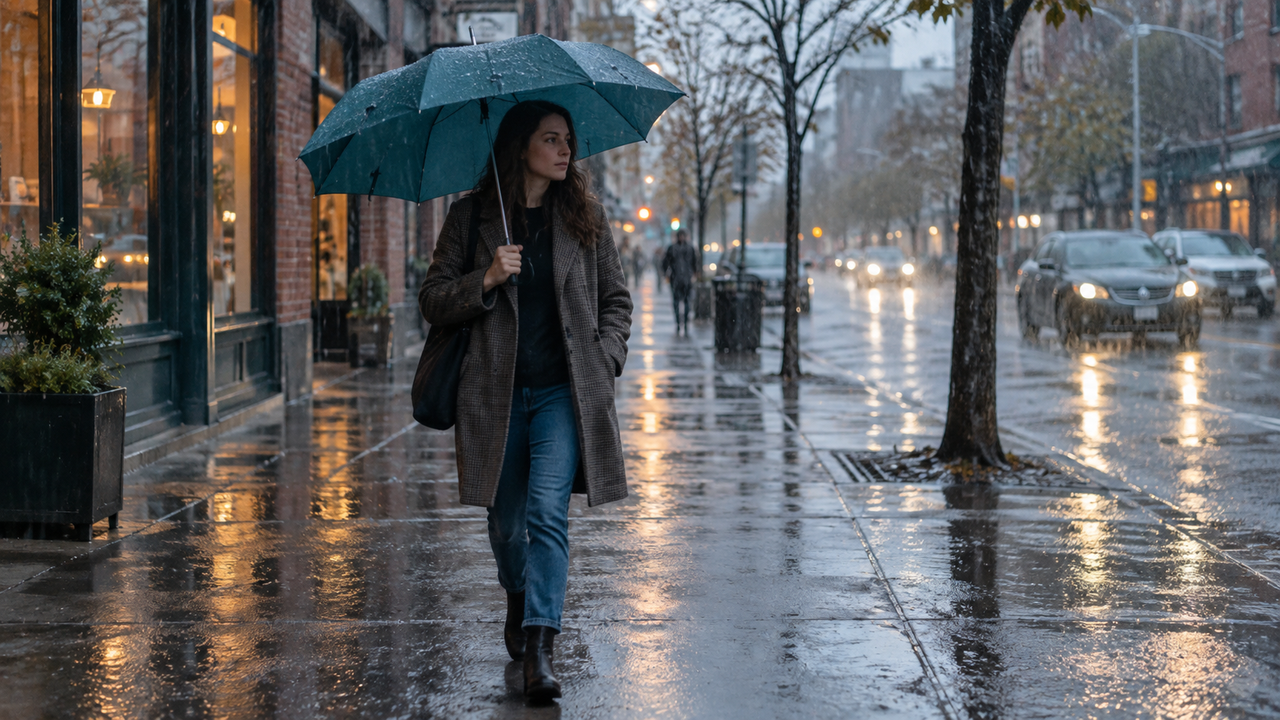
Rainy-day photography works best when the weather remains part of the photograph. The point is not to make an overcast afternoon look sunny. It is to let rain, reflections, soft light, and people share the frame, so the image still feels like the day you experienced.That starts before editing. A wet sidewalk needs an angle that catches reflected light. A person under an umbrella needs enough exposure to remain recognizable without turning the gray sky white. For iPhone users who want a quick moody visual direction while keeping the option to shoot or edit a library photo, WayShot is worth considering. Its official App Store listing describes scene-based camera Styles, not a dedicated rain mode, so it fits best when the original frame already contains the weather, subject, and place.
Rain Is Part of the Subject
A convincing rain photo shows what the weather changes, not merely that the sky is gray.
Rain becomes visible through darker pavement, small highlights on umbrellas, soft reflections under storefronts, droplets on glass, ripples in puddles, and the reduced contrast of distant buildings. If those details disappear, the photograph may look dull rather than atmospheric.The strongest frames connect several of these signals. A person crossing a wet street gains context when a traffic light repeats in the pavement. A coffee cup beside a window feels more specific when droplets break up the view outside.This is also why aggressive clarity is risky. Raising local contrast can make every droplet and surface edge compete for attention. Heavy saturation may turn reflected signs into blocks of color, while added warmth can erase the cool, low-contrast character of the day. A moody iPhone photo does not have to be dark, but it should keep the soft transitions that made the weather visible.
Each Rainy Scene Needs a Different Frame
Rainy streets, windows, puddles, umbrellas, and indoor scenes reveal weather in different ways, so one composition cannot serve them all. On a street, connect a moving person with a reflective surface. A slightly lower angle can give the pavement more space, but keep the phone secure and away from splashing traffic. Let storefronts create direction instead of filling every edge with signs.Through a car or café window, decide whether the droplets or the scene beyond them should be sharp. Focusing on the glass turns the outside world into color and shape; focusing beyond it makes droplets a softer foreground layer. An accidental focus point usually looks unresolved.Puddle reflections become stronger when the reflected subject is easy to recognize. A building edge, umbrella, bicycle, or bright coat gives the upside-down image an anchor. Include part of the real scene when the reflection alone feels abstract, and watch for umbrellas cutting across faces.For an indoor window portrait, expose for the face while allowing the window to remain bright but textured. A hand around a mug or a shoulder turned toward the glass can carry more atmosphere than a rigid pose. The result should read as a person inside a rainy place, not a portrait pasted over white.
People Should Stay Recognizable Without Losing the Weather
The person needs a readable face or gesture, but brightening the entire frame can remove the overcast atmosphere that gives the image meaning.
Start by tapping the subject on the iPhone screen and checking both the face and the brightest reflection. Apple explains that the Camera app lets you move the focus area, adjust exposure beside it, and hold for AE/AF Lock. Those controls are more useful than trying to rescue a badly exposed frame later.When the subject is walking, prioritize timing over a dramatic effect. Take several frames as the stride or umbrella angle changes. Keep the lens dry; one large drop can create a broad smear that no camera Style can separate from the scene. If light is very low, ask for a brief pause. Motion can feel lively, but accidental blur is not the same as atmosphere.Skin and clothing should remain plausible under cool daylight and mixed storefront light. If an edit makes the face unusually orange, turns a neutral raincoat neon, or removes all shadow detail, compare it with the original. Weather can be expressive without changing the identity of the person or the place.
Capture-Time Style and Later Editing Solve Different Problems
Use a camera Style while shooting when the scene is stable enough to judge, and edit later when rain, movement, or mixed light makes capture the priority.
A live direction can show whether a reflection needs a cleaner finish or a café scene works better with lower intensity. It can also relate a short set without forcing every photo into the same treatment.WayShot's official listing says users can choose a camera Style, then shoot or edit in a few taps. Its current descriptions position DigiLite around lighter grain and daylight, B&W around contrast and texture, and ProCam around a clean, polished finish. None is presented as a rain preset. For that reason, treat them as starting directions: compare a subdued daylight frame with DigiLite, consider B&W when shape and reflection matter more than color, or try ProCam when the source already has delicate color that should remain clean. The WayShot Style guide provides a broader scene-by-scene comparison.Editing afterward is safer when droplets move across glass, a subject crosses the street, or brightness changes between storefronts. Capture a usable original first, then compare treatments from the library. This also helps preserve natural color and composition across a rainy sequence.
WayShot Fits Direction, Not Weather Repair
WayShot makes the most sense for iPhone users who already have a clear rain photo and want a fast, coherent visual treatment.
It suits casual street photographers, café visitors, travelers, and social creators who prefer an overall direction to a long panel of controls. Shooting with a Style or processing a library photo is useful when weather changes quickly.The fit has limits. WayShot does not make an iPhone waterproof, record rain that the lens never captured, restore a clipped white sky, remove a large water smear, or recover detail from severe motion blur. It is not a substitute for selective exposure work, object removal, or precise color correction. The best source frames already show the person, wet environment, and key reflection before a Style is applied. For a wider view of that role, see how WayShot approaches everyday iPhone photos.WayShot's current US App Store listing identifies it as iPhone-only and requiring iOS 18.0 or later. Check the listing on your device before downloading, because compatibility and product details can change.
Native Camera, Protective Gear, and Manual Editors Still Matter
The native Camera, weather protection, and a manual editor are better choices when technical control or physical protection matters more than speed.
Use the native Camera for direct access to focus, exposure, grid, level, or other controls supported by your iPhone. A stable grip and clean lens matter more than a stronger preset when light is low.Do not treat water resistance as permission to expose a phone carelessly. Apple states that splash, water, and dust resistance are not permanent and can decrease with normal wear. In sustained rain, use a suitable cover, keep ports and accessories dry, and move to shelter when conditions become unsafe. A dedicated waterproof camera or housing is the better tool for heavy spray, storms, or deliberate shooting near open water.Choose a manual editor when the face and background need different exposure changes, a bright sign needs selective control, or an object must be removed. Dedicated equipment becomes valuable for faster shutter control, cleaner low-light files, optical reach, or dependable operation in severe weather. A Style can shape existing information; it cannot replace what was never recorded.Good iPhone rain photos do not apologize for gray light. They let a reflection glow without turning it fluorescent, keep a person readable without flattening the street, and use droplets or mist as evidence of place. Preserve the weather first. The visual character should deepen that memory, not overwrite it.
FAQ
Which aesthetic camera app is best for rainy-day café photos?
Choose an app that lets you preserve window light and natural color instead of forcing one heavy effect. WayShot is a shortlist option for iPhone users who want scene-based Styles and the choice to shoot or edit a library photo.
Is WayShot free to download on iPhone?
The current US App Store lists WayShot as free with in-app purchases. Pricing and available purchases can change, so check the live listing before downloading.
Is WayShot available on Android?
The current US App Store identifies WayShot as iPhone-only. The official listing does not establish Android availability.
Should I choose a camera Style while shooting in the rain or edit later?
Shoot with a Style when the scene and light are stable enough to evaluate. Edit later when movement, droplets, or changing light make focus, exposure, and timing more important.
Can a moody camera app fix a blurry rain photo?
No. A Style can change color, contrast, and overall character, but it cannot recover a missed focus point, severe motion blur, a water-smeared lens, or detail that was never captured.