

How to Recreate the Early-2000s Digicam Look With WayShot
What Is the Short Answer?
To recreate an early-2000s digicam look with WayShot, start with the DigiCam Style for bold flash, visible grain, saturated color, and an intentionally imperfect digital-camera feel. Keep the subject fairly close, leave some of the room in the frame, and let direct light create a brighter foreground against a darker background. Use DigiLite instead when the scene is outdoors or naturally bright. WayShot can be used while shooting or with a photo from your library, so the same visual direction can work for new moments and existing camera-roll images.
What Makes a Photo Feel Like It Came From an Early-2000s Digicam?
The look is not created by grain alone. It comes from several cues working together: assertive frontal light, lively color, visible texture, simple framing, and a little roughness around highlights and shadows. Early compact-camera photos often made nearby faces or objects feel brighter while the room behind them stayed darker and less controlled.That contrast is why a convincing digicam photo feels immediate rather than carefully produced. The frame can be slightly loose. A hand may enter the edge. A lamp, mirror, drink, or doorway can remain in the background. The goal is not to make the image look damaged; it is to keep the atmosphere of a real moment.
Which WayShot Style Should You Start With?
Start with WayShot’s DigiCam Style when direct flash and after-dark energy are central to the photo. WayShot’s current official App Store description defines DigiCam through bold flash, visible grain, saturated color, and a digital-camera feel designed for nights out, parties, concerts, and late-night memories.
When Is DigiCam the Better Choice?
DigiCam is the strongest starting point for birthday dinners, house parties, restaurant portraits, mirror photos, concert moments, and close snapshots of friends after dark. It also works for ordinary objects—cake, jewelry, a handbag, a drink, or a table setting—when a bright foreground and darker room help the frame feel spontaneous.The Style is intentionally noticeable. If the photograph already has delicate daylight color or a quiet mood, the stronger flash-led treatment may overpower it. Keep the original and compare faces, bright highlights, and small details before sharing.
When Should You Use DigiLite Instead?
Choose DigiLite when the scene is naturally bright and you want a lighter early-digital feeling without making flash the main event. WayShot describes DigiLite with lighter grain, warm color, and no-flash ease for travel, beach days, group photos, and casual photo dumps. This makes it a better fit for afternoon walks, road trips, sunny rooms, and daytime friend photos.If you are unsure, let the light decide: DigiCam for a bold after-dark flash look; DigiLite for warm daylight color with less visual weight. The WayShot Style guide explains how the current options differ by scene and mood.
How Should You Frame the Photo Before Taking It?
Move close enough for the subject to catch the light, but do not crop so tightly that the setting disappears. A shoulder-up portrait with a doorway, restaurant booth, tiled wall, or party light behind it usually feels more believable than a perfectly isolated face.Try these simple choices:
- Keep the subject within a few steps of the camera so the flash-led effect has a clear foreground.
- Leave one or two background details in the frame to preserve the location.
- Use eye-level or slightly tilted framing instead of making every shot perfectly symmetrical.
- Hold the phone steady when the room is dark; a Style can shape mood, but it cannot recover a missed expression or motion-blurred detail.
- Take one safer frame before experimenting with movement or an off-center crop.
Which Real-Life Scenes Work Best?
How Can You Photograph Friends at a Party?
Ask friends to stay close together and look toward the camera, then include a little of the room around them. A birthday cake, metallic decoration, colored light, or reflective glass can catch the brighter highlights that make direct-flash photos feel lively. Use DigiCam when the flash character is part of the memory, not something you are trying to hide.
How Can You Make a Casual Portrait Feel More Authentic?
Avoid over-directing the pose. A turned shoulder, half-smile, or quick glance often suits the style better than a formal portrait. Keep skin texture and familiar facial details recognizable. If the result feels too warm, too contrasty, or too polished for the moment, return to the original or try a quieter Style.
How Can You Use the Look for Objects and Details?
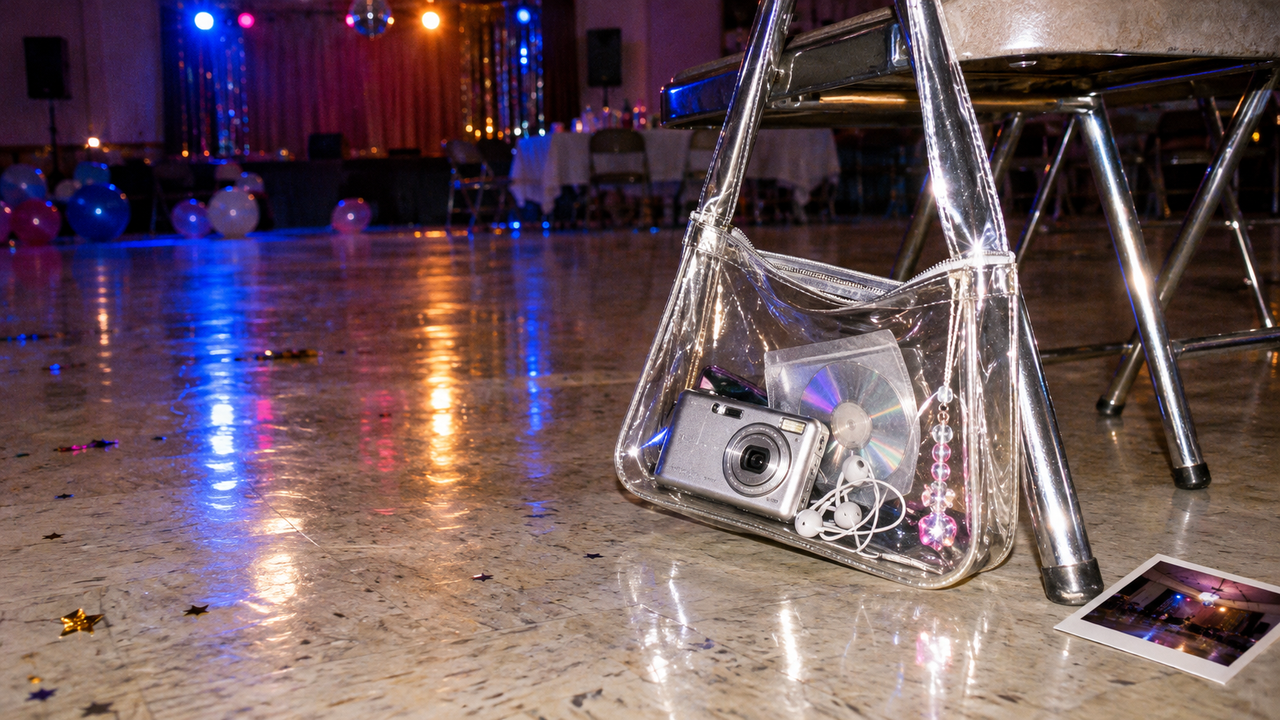
Place the object near the camera and let the surrounding room fall away slightly. Silver accessories, glossy bags, CDs, glassware, chrome furniture, and reflective fabric respond especially clearly to hard frontal light. One object with a strong highlight usually feels more convincing than a crowded flat lay.
How Can You Keep Daytime Photos From Looking Overedited?
Use DigiLite for open shade, window light, or outdoor scenes. Let the original daylight carry most of the image, then use the warmer color and lighter grain as a finishing direction. If a bright sky or pale shirt already sits near pure white, check the result closely so the highlight still contains useful detail.
Should You Choose the Style Before Shooting or Edit Later?
Choose the Style before shooting when the light is predictable and seeing the visual direction early helps you decide subject distance, framing, and background. This is useful for a planned birthday portrait, mirror photo, or still life that you can repeat.Edit a library photo later when the moment cannot be repeated or the lighting changes quickly. WayShot’s official listing supports both routes: shoot with a camera Style or edit a photo from your library. For a simple post-capture workflow, follow the five-step digicam editing guide, then compare the finished image with the original at full size.
How Can You Make a Whole Photo Set Feel Consistent?
Consistency does not mean forcing every image through the same treatment. Start by grouping photos made under similar light. Use DigiCam across the night-out frames and DigiLite across the daytime frames, then keep repeated visual cues—similar subject distance, one recurring accent color, and a comparable amount of background.A good set can still include variation. One close portrait, one wider group shot, and one object detail will feel connected when the color, texture, and flash logic belong to the same occasion. That rhythm is closer to a real camera roll than a sequence of identical edits.
What Should WayShot Not Be Expected to Fix?
A Style can guide color, contrast, grain, and mood, but it cannot restore information that was never captured. Heavy motion blur, missed focus, blocked shadows, and completely blown highlights remain source-image problems. DigiCam is most useful when the expression, framing, and basic exposure already work and the photo needs a clearer early-digital direction.
What Else Should You Know?
Can WayShot make an iPhone photo look like an early-2000s digital camera?
WayShot’s DigiCam Style is designed around the most recognizable cues: bold flash, visible grain, saturated color, and an intentionally imperfect digital-camera feel. The result still depends on the original light, subject distance, framing, and detail in the source photo.
Is DigiCam only for nighttime photos?
No, but it is the clearest fit for after-dark scenes and direct-flash energy. For daylight travel, beach, group, or casual photo-dump images, DigiLite is usually the more natural starting point.
Can existing camera-roll photos be edited in WayShot?
Yes. WayShot’s official App Store description says users can shoot with a camera Style or edit photos from their library.
Should every photo in a set use the same Style?
Not necessarily. Match the Style to the lighting first. A night-out set can lean on DigiCam, while daytime frames from the same weekend may look more natural with DigiLite.
Does more grain always make a photo look more authentic?
No. Grain works when it supports the light, color, and mood already present. Heavy texture on an already noisy or blurry photo can make important details harder to read.
Ready to Recreate the Look?
Start with one well-framed photo, choose DigiCam or DigiLite according to the light, and compare the result with the original before building the rest of the set.
Download WayShot for iPhone on the App Store or for Android on Google Play