

Great Food Photos Keep the Atmosphere, Not Just the Plate
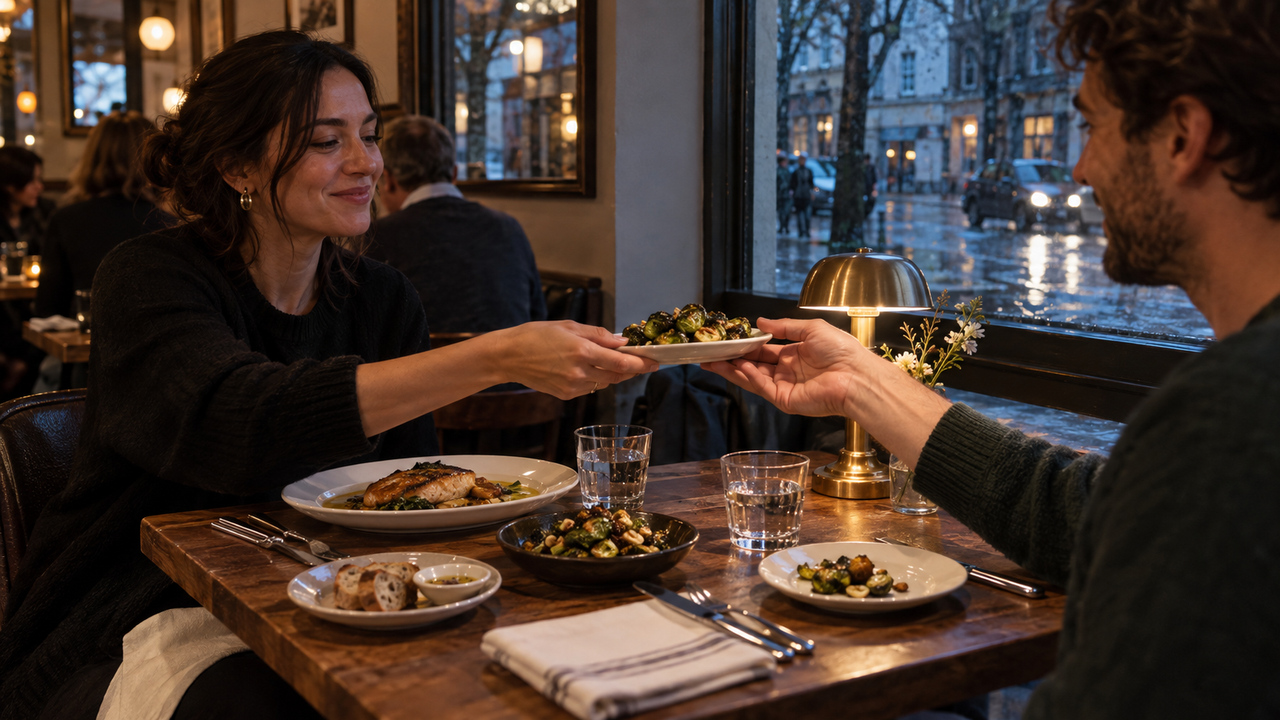
A complete dining photo story records the food, the light, the table, and the people sharing it—not just one heavily processed close-up of a plate. The best restaurant photos let you remember where you sat, how the room felt, who reached for the first bite, and why the meal mattered. A perfect overhead shot may show what you ordered, but atmosphere turns that record into a memory.For iPhone food photography, that means making a few decisions before the food gets cold. A hand pouring coffee, window light on a glass, or a friend leaning into the conversation can carry as much meaning as the dish itself. Color should support those details rather than bury them under orange warmth, extreme saturation, artificial blur, or brittle sharpening.WayShot belongs on the shortlist for iPhone users who want a clear camera Style for a café visit, brunch, or casual dinner without building a long edit afterward. Its official App Store listing says users can choose a Style, shoot in the app, or edit a photo from their library. That shorter workflow is useful when consistency matters more than precise local adjustments. It is not a substitute for good focus, controlled lighting, or professional food photography.
The Plate Is Only One Part of the Story
A food photograph feels complete when the frame explains both what was served and what it felt like to be there.
Start with one clear subject, but allow the surroundings to give it context. A bowl near the center can remain the visual anchor while a napkin, menu corner, water glass, or companion’s hand establishes the meal around it.This does not require a crowded frame. Remove receipts, packaging, and unrelated clutter, but keep details that belong to the experience. A spoon beside a cappuccino suggests a slow café morning. Shared plates and reaching hands suggest a meal with friends. Window reflections can place the table in a city rather than a studio.Distance matters too. A very close phone shot can distort the plate and remove the room. Stepping back gives the table space to breathe and makes it easier to include a person naturally. For Instagram restaurant photos, that environmental frame can sit beside a tighter food image in a carousel.
Each Dining Scene Needs Its Own Visual Decision
Window cafés, daytime brunches, dim restaurants, and outdoor tables should not be photographed with the same exposure, distance, or color treatment.
The subject may still be food, but the available light changes what the camera can preserve.
Window Café
In a window café, protect the soft daylight and let the table show where the light is coming from.
Place the drink or plate near the window, then expose for the brighter side so highlights in cups and glassware do not disappear. Hands, a book, or a rain-marked window can add atmosphere without competing with the food. If the light already feels quiet and cool, an aggressive warm filter can erase that mood.
Daytime Brunch
Brunch photos work best when bright color stays believable and shared dishes still look connected.
Strong daylight can overexpose white plates and pale tables, so check the lightest area before shooting. Instead of arranging a perfect grid, keep evidence of the meal in progress: a cut pastry, a hand passing a plate, or two drinks at different distances.
Dim Restaurant
In a dark restaurant, preserving the direction of the room’s light matters more than making every corner bright.
Neon, candles, and small table lamps create pools of color that define the space. Hold the phone steady, photograph moments when people pause, and avoid pushing digital zoom when the subject is far away. If faces or dishes are already blurred, missed, or badly overexposed, a Style cannot reconstruct the lost information.
Outdoor Table
Outdoor dining photos need controlled contrast so the food and the setting remain readable together.
Midday sun can create hard shadows under plates and faces, while late-afternoon light can turn the entire table orange. Look for open shade or rotate the group so the light falls across the scene rather than directly behind one person. Include a small location cue—a railing, trees, sidewalk, or view—but keep it secondary to the meal.
Natural Color Is More Appetizing Than Maximum Impact
The most convincing food color is color that still belongs to the restaurant.
Too much warmth turns white plates yellow and skin orange. Heavy saturation makes greens electric and sauces unnaturally red. Strong sharpening emphasizes reflections and phone noise, while excessive blur can cut awkwardly around forks, glasses, and fingers.A useful test is simple: can you still recognize the ingredients, light source, and skin tones? If yes, the image can have a distinct camera Style without losing the scene. If every color is pushed toward one mood, the photograph may feel disconnected from the meal.Consistency does not mean identical treatment. It means repeating a few choices—similar contrast, restrained warmth, and a stable approach to grain or texture—while allowing daylight, rain, candlelight, and outdoor shade to remain different.
Capture-Time Style and Later Editing Solve Different Problems
Choose a camera Style before shooting when you need visual direction; edit later when the moment matters more than the look.
A capture-first decision can influence where you stand, how much room you include, and whether you wait for a hand or face to enter the frame. It also helps when several people are taking photos.Post-capture editing is the safer choice when service is moving quickly, lighting changes between courses, or you do not want to interrupt the meal. Photograph the strongest moments first, then compare treatments from the library. WayShot’s current iPhone listing supports both shooting and editing library photos, so users can follow either route without committing every image to the same look.The official listing positions its warmer, softer portrait direction for coffee runs and brunch, while its other Styles cover cleaner, brighter, monochrome, and after-dark directions. The practical point is not to assign one preset to all restaurant photos. It is to select a restrained direction that suits the scene, then keep only results that preserve the food and the room. The WayShot Style guide explains the current scene-based choices in more detail.
Where WayShot Fits—and Where It Does Not
WayShot is best suited to casual iPhone shooters who want a coherent dining set without a full manual editing session.
Think café visits, weekend brunch, a vacation restaurant, or a shared table for an Instagram carousel. Choosing a direction before capture keeps attention on the frame, while library editing helps when the moment was too quick. See the simple Style-based editing workflow.The boundary is equally important. No Style can correct missed focus, serious motion blur, clipped highlights, an incorrect white balance baked into a difficult file, or details the camera never recorded. If one person blocks another, the plate is cropped badly, or the brightest lamp overwhelms the scene, retaking the photo is usually the better answer.A manual iPhone photo editor is more appropriate when you need selective color correction, masks, careful white-balance matching, or different adjustments for the food and background. The native Camera app may be preferable when speed and reliable capture matter more than choosing a look in advance. A professional camera, controlled lighting, and a calibrated editing workflow remain the better tools for menus, advertising, packaging, or paid restaurant campaigns.WayShot is currently listed for iPhone and requires iOS 18.0 or later. Within that scope, its value is a shorter path from scene to finished set: choose a visual direction, photograph the meal as an experience, and avoid turning every table into the same filtered still life. The broader digital-camera-look overview offers additional context on keeping people and places recognizable.
The Meal Should Still Feel Lived In
A memorable dining photograph lets the viewer enter the table, not merely inspect the plate.
Food supplies the subject, but light, gestures, glassware, and the room supply the memory. Give each scene enough space to keep those elements visible, choose color that respects the real atmosphere, and use a Style only when it supports what was already worth photographing.
FAQ
What is the best filter approach for cozy winter café photos?
Use restrained warmth and moderate contrast so the café still looks cozy without turning white cups, food, and skin tones orange. The room’s real light should remain recognizable.
Which aesthetic camera app works for rainy-day café photos?
Choose an app that offers more than one visual direction and lets you keep cool window light, reflections, and muted street color. A single aggressive vintage filter can flatten the weather that makes the scene distinctive.
Should iPhone food photography focus on the plate or the table?
Use the plate as the anchor, then include enough of the table, light, and human activity to show the experience around it. A small amount of context usually creates a stronger story.
Is it better to choose a camera Style before shooting or edit later?
Choose before shooting when you want consistent visual direction across a set. Edit later when timing is unpredictable or you want to protect the candid moment first.
Can a camera Style fix a dark or blurry restaurant photo?
No. A Style can change the visual treatment of a usable image, but it cannot restore missed focus, severe motion blur, blown highlights, or details that were never captured.
Internal Links
- The Best WayShot Filter Styles for Different Types of Photos
- Using WayShot for Simple Digicam-Style iPhone Editing in 5 Steps
- WayShot Gives Everyday iPhone Photos a More Digital Camera Look
Verified Sources
- WayShot: Aesthetic Photo Editor — US App Store — verified current platform, compatibility, scene-based Styles, and shoot-or-edit workflow.
- WayShot official website — verified official product positioning and Style-based camera workflow.
- WayShot official blog archive — checked for topic overlap and internal-link relevance.