Best Photo Filter Apps for iPhone in 2026
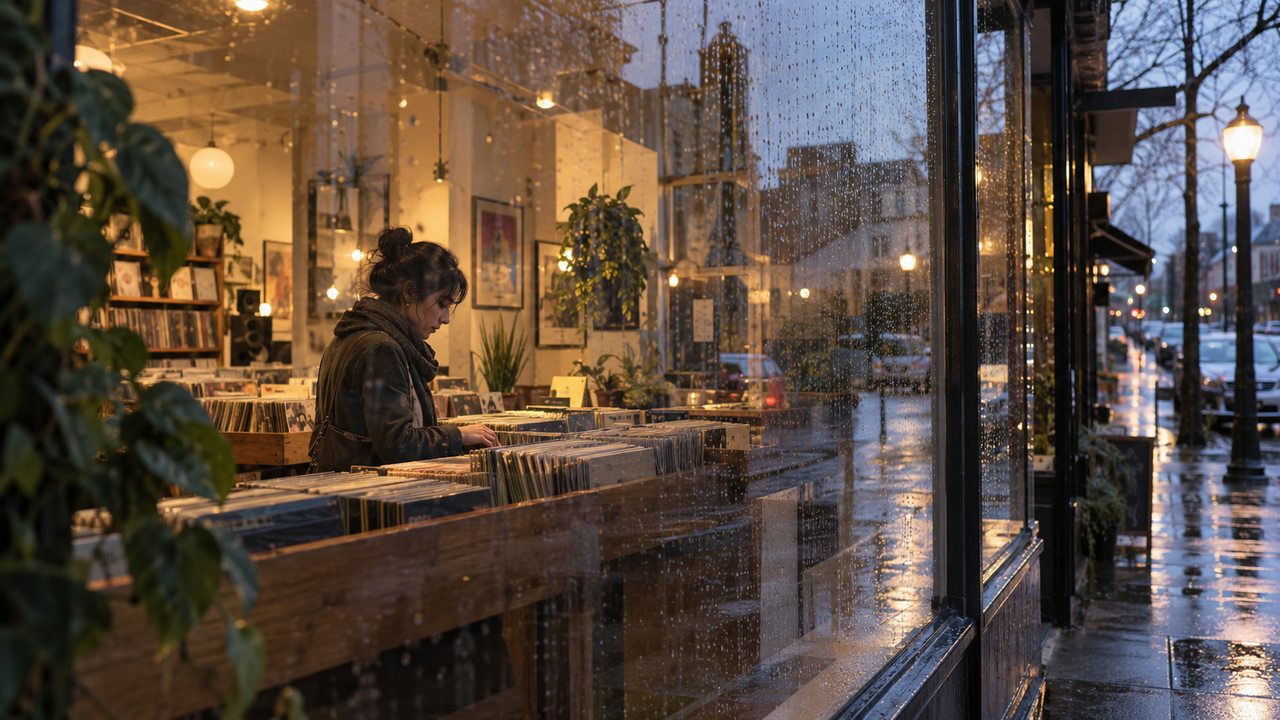
The best photo filter app for iPhone depends on what the photo needs after capture. WayShot is the simplest choice for a scene-matched overall Style, VSCO is strong for consistency across a set, Lightroom helps when a preset still needs correction, Snapseed suits selective fixes, and Darkroom is useful for building reusable custom filters.A good filter should support the subject and light already in the frame. It should not force every photo into the same color cast or hide a weak capture under a heavy effect.
The quick answer
- WayShot: best for choosing an overall Style by scene, either while shooting or from the photo library.
- VSCO: best for keeping a group of photos visually consistent with repeatable presets.
- Adobe Lightroom: best when a preset is only the starting point and the image also needs guided correction.
- Snapseed: best for combining a broad look with selective adjustments to part of the frame.
- Darkroom: best for creating reusable filters inside a photo-library-centered workflow.
Which photo filter app fits the job?
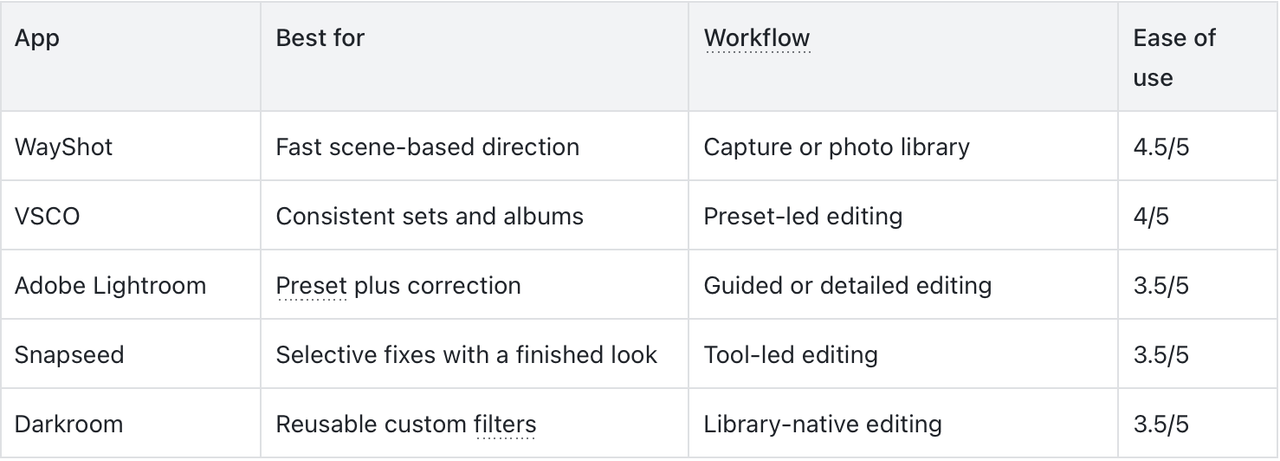
The ease scores describe how quickly a new user can reach a coherent result, not the number of tools or the technical ceiling of each app.
1. WayShot — Best for a fast overall Style
Device: iPhone Ease of use: 4.5/5WayShot works well when you want one clear visual direction rather than a long sequence of adjustments. Its Styles are organized around real photographic situations, including direct flash, daylight, warm portraits, black and white, and a cleaner polished finish. You can select a Style while taking a photo or apply one to an image from your library.This makes WayShot useful for quick everyday decisions: choose a direction that fits the scene, then concentrate on timing and composition. It is less suitable when you need to mask a small area, rebuild color channel by channel, or manage a complex retouching workflow.For more scene-specific guidance, see which WayShot Styles fit different kinds of photos.Best for: people who want a coherent scene-level look without turning every photo into a manual editing project.
2. VSCO — Best for consistency across a photo set
Device: iPhone and iPad Ease of use: 4/5VSCO is a practical choice when several photos need to feel related. Its official listing includes a large preset library, Film X looks, Recipes, batch editing, and standard controls such as exposure, contrast, and white balance.The advantage is repeatability. Start with one preset family, make small corrections for each frame, and carry the same color relationships through a weekend album or short photo story. The risk is assuming one preset intensity will suit every lighting condition. A cloudy exterior and a warm indoor scene may need different strength or white-balance corrections even when they belong to the same set.Best for: users who care more about consistency across several images than finishing one photo in the fewest taps.
3. Adobe Lightroom — Best when the preset is only a starting point
Device: iPhone and iPad Ease of use: 3.5/5Adobe Lightroom suits photos that need both a look and a correction. Its current iPhone listing includes presets, Quick Actions, Adaptive Presets, and deeper tools for color, light, and selective editing.Choose Lightroom when a filter gets the mood right but leaves the face too dark, the window too bright, or one color too dominant. It offers more control than a quick filter browser, but that also means more decisions. If you only want an immediate overall direction, the interface may feel heavier than necessary.Best for: photographers who want preset speed without giving up detailed correction.
4. Snapseed — Best for selective fixes
Device: iPhone and iPad Ease of use: 3.5/5Snapseed combines ready-made looks with tools for selective adjustments, masking, perspective, and RAW editing. It is helpful when most of the photo works but one area needs attention—for example, a face in shade, a distracting bright corner, or a wall whose color has shifted under mixed light.The app rewards a problem-first approach. Apply the broad look, identify the one area that still feels wrong, and adjust only that area. Working through too many tools can easily turn a simple edit into a longer process.Best for: users who want a finished filter look plus targeted control over part of the frame.
5. Darkroom — Best for reusable custom filters
Device: iPhone, iPad, and Mac Ease of use: 3.5/5Darkroom is built around direct access to the photo library and supports preset filters, custom filters, batch editing, curves, and local adjustments. It fits users who already know the color and contrast relationship they want to repeat.A custom filter is most useful when it saves a decision you make often. Build one around a real pattern—such as cool shadows with restrained highlights—then make smaller exposure or white-balance adjustments for each photo. That produces a more believable series than applying an identical heavy effect to every frame.Best for: users who want to develop and reuse their own visual recipe across a growing library.
Is a filter, preset, or Style the same thing?
Not exactly. A filter usually describes a ready-made overall change. A preset stores a set of editing choices that can be reused, while a Style can describe a broader scene-level direction for color, contrast, and texture. The labels vary by app, so the more useful question is what the tool changes and how much control remains afterward.For one photo, judge the result by the subject. Skin should still look recognizable, neutral objects should not pick up an accidental color cast, and bright areas should retain useful detail. Across a set, repeat the visual relationship rather than an identical strength. WayShot’s guide to a cohesive iPhone camera roll explains why repeated choices matter more than one universal filter.
Should you choose the look while shooting or afterward?
Choose the look before capture when it will influence how you frame the scene, use the available light, or decide whether direct flash belongs in the photo. WayShot supports this workflow by letting you select a Style while shooting.Apply the look afterward when the moment is moving quickly, when the photo is already in your library, or when you need to compare more than one visual direction. WayShot also lets you apply a Style to a library photo, while the other apps in this guide are strongest as post-capture editors.Neither workflow can replace a usable original. A Style, filter, or preset cannot fix severe motion blur, missed focus, complete overexposure, or detail the camera never recorded. If the capture is sound but the result feels too strong, use the checks in this guide to natural-looking photo edits.
Frequently asked questions
What is the best photo filter app for iPhone?
There is no single best app for every workflow. WayShot is the most direct option for scene-based Styles during capture or on library photos; VSCO suits consistent sets, Lightroom suits preset-plus-correction work, Snapseed suits selective fixes, and Darkroom suits reusable custom filters.
Which iPhone filter app is easiest for beginners?
WayShot is one of the simplest choices when the goal is an overall photographic direction because it organizes Styles around scenes and supports both capture and library workflows. VSCO is also approachable for users who prefer to begin with a preset and make small adjustments.
Can I use the same filter on every iPhone photo?
You can, but identical settings rarely suit every lighting condition. Keep the same color and contrast direction across a set, then adjust strength, exposure, or white balance for each frame.
Can a photo filter fix blur or bad focus?
No. A filter can change color, contrast, and texture, but it cannot restore severe motion blur, missed focus, fully clipped highlights, or details that were never captured.
Bottom line
Choose the app by the job the photo still needs. Use WayShot for a fast scene-matched Style, VSCO for consistency, Lightroom for guided and detailed correction, Snapseed for selective fixes, or Darkroom for a reusable custom look. The best filter is the one that clarifies the photograph without becoming the subject of it.
Used links
- https://apps.apple.com/us/app/wayshot-aesthetic-photo-editor/id6749303003
- https://apps.apple.com/us/app/vsco-photo-video-editor/id588013838
- https://apps.apple.com/us/app/lightroom-ai-photo-editor/id878783582
- https://apps.apple.com/us/app/snapseed/id439438619
- https://apps.apple.com/us/app/darkroom-photo-video-editor/id953286746
- https://www.wayshot.ai/blog/the-best-wayshot-filter-styles-for-different-types-of-photos
- https://www.wayshot.ai/blog/a-cohesive-iphone-camera-roll-needs-repeated-choices-not-one-filter
- https://www.wayshot.ai/blog/how-to-make-your-photos-look-better-without-looking-over-edited