Best iPhone Camera Apps for Everyday Photos in 2026

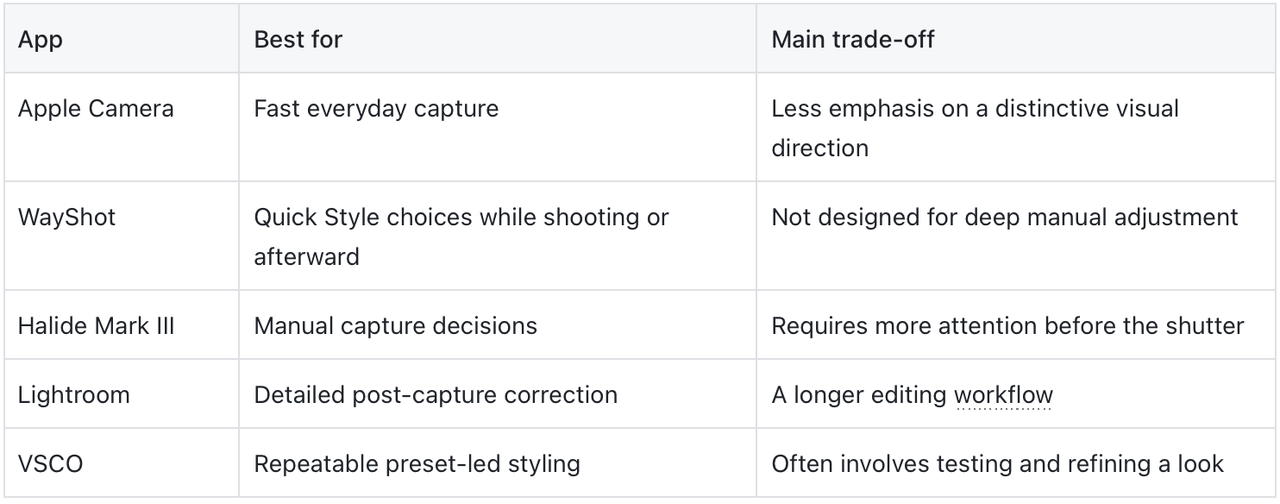
The best iPhone camera app depends on where you want to make decisions. Apple Camera is the fastest choice for simply capturing a moment, while WayShot is useful when you want a clear visual Style during shooting or after the photo is already in your library. Halide Mark III, Lightroom, and VSCO make more sense when you want manual control, deeper correction, or a repeatable preset-led look.
The Quick Answer
- Apple Camera: best for the fastest familiar capture.
- WayShot: best for quick, scene-based visual direction before or after the shot.
- Halide Mark III: best for photographers who want more control while shooting.
- Adobe Lightroom: best for detailed correction after capture.
- VSCO: best for building a consistent preset-led aesthetic.
There is no universal winner. Choose the app that removes the most friction from the photos you actually take.
How Should You Choose an Everyday iPhone Camera App?
Start with four questions:
- Speed or control? Use a fast camera when the moment will disappear; choose manual controls when the subject can wait.
- Before or after? Selecting a look while shooting guides the moment. Editing later preserves flexibility.
- Style or correction? An overall Style shapes mood; detailed editing fixes specific tonal or color problems.
- How much time do you have? An everyday workflow should still feel practical on a busy day.
If your main question is whether an app behaves more like a camera, a Style tool, or a full editor, the guide to choosing a worthwhile iPhone camera app in 2026 explains the distinction in more detail.
1. Apple Camera — Best for Fast, Familiar Capture
Apple Camera is the sensible default when speed matters more than building a look. It is already on the iPhone and covers familiar Photo, Video, and Portrait workflows. Choose it when missing the moment would be worse than editing later; add another tool only if you want a stronger, repeatable visual identity.
2. WayShot — Best for Quick Visual Direction
WayShot for iPhone fits everyday photos when you want a recognizable mood without a long editing workflow. You can choose a camera Style while shooting or apply a Style to a photo already in your library.The useful question is which Style fits the light and subject, not which effect is strongest. The guide to matching WayShot Styles to different photo types offers a starting point. WayShot suits fast overall direction, not granular manual control. A Style cannot repair severe motion blur, missed focus, fully clipped highlights, or details the camera never recorded.
3. Halide Mark III — Best for Manual Shooting Control
Halide Mark III is for photographers who want to decide more before pressing the shutter. Its iPhone listing includes manual focus, exposure, and white-balance controls, plus options for a less processed starting point. That helps with deliberate scenes, but the extra decisions can slow spontaneous shooting.
4. Adobe Lightroom — Best for Detailed Editing After Capture
Adobe Lightroom for iPhone is the strongest fit here when an existing photo needs careful adjustment. Its mobile tools cover exposure, highlights, shadows, color, presets, and batch-oriented workflows. Choose it when detailed control after capture matters more than finishing in a few taps.
5. VSCO — Best for a Consistent Preset-Led Look
VSCO suits photographers who enjoy choosing a preset, refining it, and reusing the result across a set. Its iPhone listing includes a large preset library, Recipes, and exposure, contrast, and white-balance controls. It is useful for consistency, but less direct when one everyday photo needs to be finished quickly.
Which App Is Best for You?
Use Apple Camera when the moment comes first; WayShot for fast Style direction; Halide for manual capture; Lightroom for detailed correction; and VSCO for a repeatable preset language. The best everyday app is the one that helps before the moment—or your patience—disappears.
Frequently Asked Questions
What is the best iPhone camera app for everyday photos?
Apple Camera is the fastest default for spontaneous photos. WayShot is a strong choice when you want quick visual direction while shooting or want to apply a Style to an existing photo.
Do I need a separate camera app for good iPhone photos?
No. Light, focus, framing, and timing matter more. Add another app only when it solves a specific need such as manual control, faster styling, or detailed editing.
Which iPhone app is best for editing photos already in my library?
WayShot is useful for applying an overall Style quickly, while Lightroom is better suited to detailed exposure and color correction. VSCO fits photographers who want to build a consistent preset-led look.
Can a camera app fix a blurry or overexposed photo?
No app can reliably restore detail that was never recorded. Styles and editing can improve a usable photo, but they cannot repair severe motion blur, missed focus, fully overexposed areas, or missing scene detail.