Best Camera Apps for iPhone Users Who Don’t Want to Edit

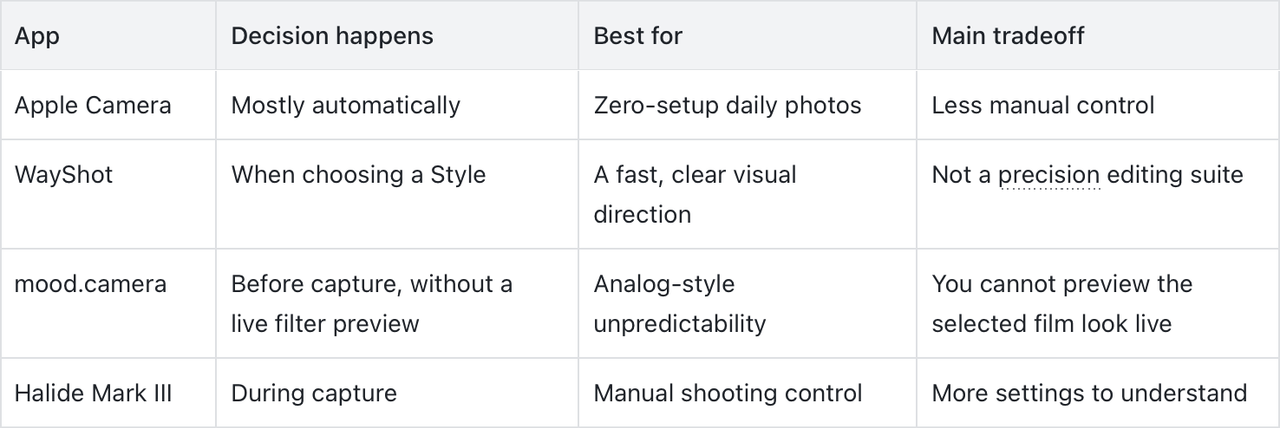
The best camera app for someone who does not want to edit is the one that puts the important choices before the shutter. Apple Camera is the simplest option, WayShot is useful when you want to choose a clear Style as you shoot, mood.camera favors analog surprise, and Halide suits photographers who would rather control the capture than repair it later.No-edit photography does not mean making no decisions. It means deciding on light, framing, exposure, and visual direction early enough that the finished photo needs little or no adjustment.
The Quick Answer
- Apple Camera: best for opening the camera and taking a dependable photo with almost no setup.
- WayShot: best for choosing an overall camera Style before shooting, with the option to apply a Style to a library photo later.
- mood.camera: best for people who enjoy an analog-style result without seeing a live filter preview.
- Halide Mark III: best for photographers who want to make exposure, focus, and processing decisions at capture.
What Does “No Editing” Actually Mean?
A no-edit workflow can mean different things. One person wants the fastest possible camera. Another wants a finished visual mood at capture. A third is happy to spend time on manual settings, as long as there is no long editing session afterward.The useful question is not simply, “Which app has the most features?” Ask when you want to make the creative decision. If the answer is before or during the shot, look for a camera that previews or applies its processing at capture. If you want complete control after the photo is taken, you are really looking for an editor.
1. Apple Camera: Best for Zero Setup
Apple Camera is the practical choice when speed matters more than a distinctive app-specific look. It is already available from the Lock Screen, and its automatic processing handles most casual daylight, family, food, pet, and travel photos without asking you to build a workflow.On supported iPhone models, Photographic Styles let you select and preview an overall mood before taking a photo. The chosen Style then applies automatically, although available controls and later adjustments depend on the iPhone model.Choose Apple Camera if your real goal is to think as little as possible about the camera. Its limitation is also its advantage: it makes many choices for you, so it is less suitable when you want deliberate manual exposure, focus, or a stronger camera-like character.
2. WayShot: Best for Choosing a Finished Direction Before You Shoot
WayShot is useful when you want a recognizable visual direction without constructing an edit from several sliders. You can choose a Style while shooting, so the look helps guide the scene before you press the shutter. If the strongest frame is already in your camera roll, you can also apply a Style to that library photo.This makes it a good fit for nights out, travel, portraits, everyday lifestyle photos, and photo dumps that need a coherent feel. The important distinction is that a Style changes the overall presentation of a usable photo; it does not replace good focus, exposure, or timing. The WayShot iPhone app is designed around scene-based camera choices and a short shoot-or-edit workflow.WayShot is not the right choice for someone who wants detailed local retouching or full manual camera controls. A Style also cannot repair severe motion blur, missed focus, complete overexposure, or detail the camera never recorded.For more context, see why a useful iPhone camera app should guide the capture and how WayShot gives everyday iPhone photos a digital-camera feel.
3. mood.camera: Best for Analog Surprise
mood.camera takes a different route to fewer edits. Its official listing describes a point-and-shoot camera with no live filter preview and no in-app editing tools. You select the direction, take the photo, and see the processed result afterward.That approach suits people who enjoy the suspense and constraints of analog photography. It can also reduce the temptation to compare effects while a moment is happening. The tradeoff is predictability: if you need to see the exact look before shooting, this workflow may feel too uncertain. Review the current controls on the official mood.camera listing.
4. Halide Mark III: Best for Capture Control Instead of Post-Processing
Halide is for a different kind of no-edit photographer: someone willing to make more decisions while shooting. Its current App Store description includes manual exposure controls such as shutter speed, ISO, and white balance, along with manual-focus aids, in-camera Looks, and Process Zero.This can produce a more intentional starting point because focus, exposure, and processing are handled before the image reaches the camera roll. It is not the easiest option for a person who wants zero setup, but it is useful for someone who enjoys shooting and dislikes correcting avoidable problems later. See the official Halide Mark III listing for its current tools.
Which Camera App Should You Choose?
Choose Apple Camera when convenience is the priority. Choose WayShot when you want to see and select a clear Style at capture, while keeping a library-photo fallback. Choose mood.camera when surprise is part of the appeal. Choose Halide when you prefer manual shooting decisions to a later editing session.Whichever app you use, do the repairable work before the shutter: clean the lens, find readable light, tap the subject to confirm focus, protect important highlights, and hold the phone steady. A strong capture is what makes a no-edit workflow possible.
FAQ
Can iPhone photos look finished without editing?
Yes. A clear subject, stable framing, accurate focus, usable exposure, and a visual direction chosen at capture can produce a finished-looking photo without a separate editing session.
Is a no-edit camera app the same as a filter app?
Not necessarily. A no-edit camera may apply a Style or processing during capture, automate technical decisions, or provide manual controls that help you get the result right before the photo reaches the camera roll.
Should I choose a Style before or after taking the photo?
Choose a Style before shooting when its preview helps you judge the light and mood. Apply a Style afterward when you already have a strong library photo or want to compare several captured expressions first.
Can a camera Style fix a blurry or overexposed photo?
No. A Style cannot restore severe motion blur, missed focus, completely overexposed areas, or detail that the camera did not record. Retaking the photo is the reliable solution when the capture has failed.