Best Aesthetic Camera Apps for iPhone in 2026
The best aesthetic camera app for iPhone depends on when you want to commit to the look. WayShot is the most direct choice for scene-based Styles during capture or on library photos; mood.camera and Hipstamatic make the aesthetic part of shooting, while VSCO and Tezza are stronger when consistency or designed content matters after capture.There is no universal winner. The right app is the one whose workflow matches how much choice you want before and after the shutter.
The quick answer
- WayShot: best for choosing an overall visual direction around the scene, either while shooting or after importing a photo.
- mood.camera: best for a committed point-and-shoot process without a live filter preview or editing tools.
- Hipstamatic Analog Camera: best for building a capture look from lens-and-film combinations.
- VSCO: best for applying a consistent preset language across a group of photos.
- Tezza: best for people who want photos to fit a designed social post, story, or feed.
Which aesthetic camera app fits your workflow?
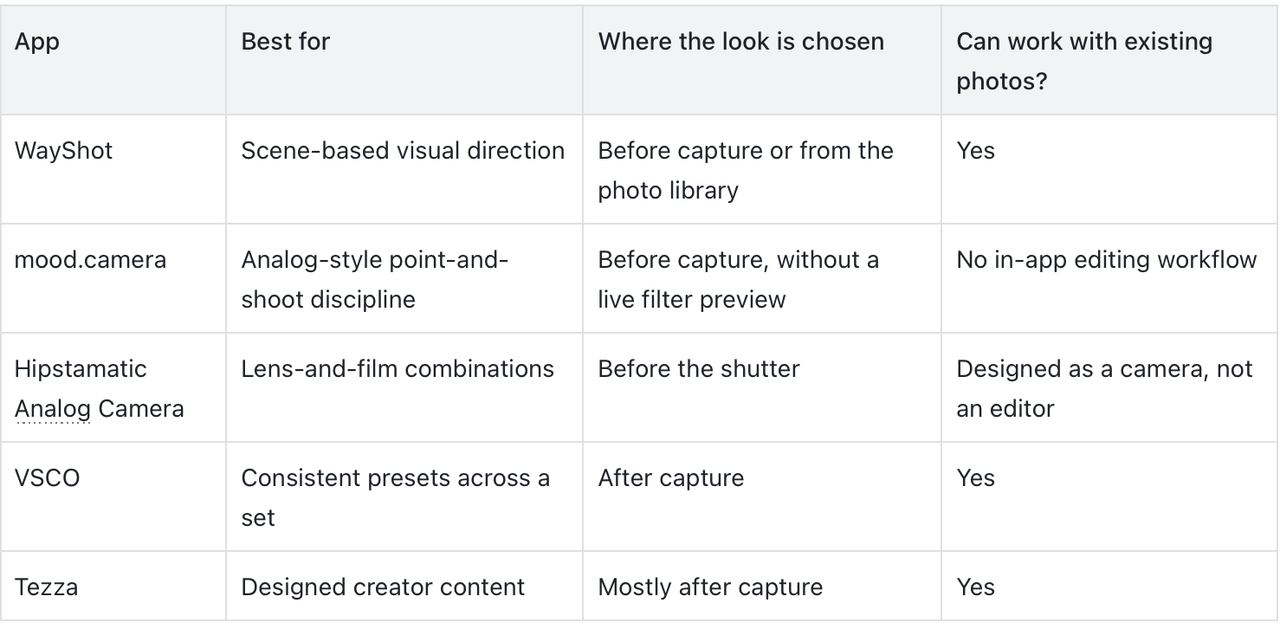
The first three are camera-first choices. VSCO and Tezza are editing-first, but they belong in this guide because many people searching for an “aesthetic camera app” actually want a repeatable visual identity rather than a replacement shutter.
1. WayShot — Best for scene-based Styles
WayShot is useful when you want to choose a visual direction without building an edit from individual sliders. You can select a Style while shooting or apply a Style to a photo already in your library.The important distinction is that a Style is meant to guide the overall relationship between color, contrast, texture, and the scene—not simply add a decorative layer. A direct-flash night photo may need a different direction from a soft daylight portrait. That makes WayShot a practical fit for users who want a fast decision but still care whether the look suits the light.Best for: people who want a clear aesthetic direction at capture time and the option to revisit existing photos later.
2. mood.camera — Best for shooting without second-guessing
mood.camera takes a deliberately restricted approach. Its official listing describes a point-and-shoot experience with film-inspired color and character, no live filter preview, and no editing tools.That limitation is the point: choose the look, pay attention to the moment, and accept the result. It suits photographers who find that constant previewing and tweaking interrupts the act of taking a photo.Best for: users who value surprise and capture discipline more than post-shoot control.
3. Hipstamatic Analog Camera — Best for lens-and-film combinations
Hipstamatic Analog Camera organizes the creative decision around virtual lenses and films selected before the shutter. The official App Store page positions it as a camera rather than an editor.This is a good fit when choosing the photographic “recipe” is part of the fun. It asks for more creative commitment than a general preset editor, but the logic is easy to understand: select a combination, then shoot with it.Best for: users who enjoy building different capture setups instead of applying one house look to every photo.
4. VSCO — Best for a consistent set of photos
VSCO is the stronger choice when the real goal is consistency across several images. Its current listing includes presets, Film X, recipes, and broader photo-editing controls.That makes it useful for a weekend album, travel set, or small series where photos were taken under different conditions but should still feel related. It requires more editing judgment than a capture-first app, so it is less suited to someone who wants the decision finished before pressing the shutter.Best for: users who want a repeatable preset language across a collection.
5. Tezza — Best for designed social content
Tezza combines photo and video presets with effects, templates, overlays, feed planning, and batch editing. Its workflow is broader than choosing how a single camera frame should look.Choose it when the final destination matters as much as the photograph—for example, when images need to work together inside a story, post, or planned feed. If you only want a focused camera experience, the extra design tools may be more than you need.Best for: creators who want an aesthetic system for publishing, not only shooting.
What makes an iPhone photo look genuinely aesthetic?
An aesthetic photo is not defined by heavy grain, a date stamp, or one fashionable color cast. The strongest looks begin with a readable subject, intentional light, controlled highlights, and color relationships that support the mood.
- Choose one visual priority. Decide whether the image is about soft skin tones, direct flash, muted daylight, deep black and white, or clean detail.
- Match the look to the light. A warm daylight style can feel natural outdoors but muddy under mixed indoor lighting.
- Protect the important detail. Watch faces, bright windows, pale clothing, and reflective surfaces before shooting.
- Keep a series coherent. For an album or post set, repeat a color relationship or contrast level instead of forcing every image into the same effect.
If you want a faster way to choose a visual direction, see WayShot’s guide to making iPhone photos look more aesthetic without a full editor. For a closer look at how personal scene choices shape the result, read why the iPhone digicam look is becoming more personal.
Should you choose the Style before or after shooting?
Choose before shooting when the look will change how you frame the scene, use the available light, or decide whether direct flash belongs in the photo. Seeing the intended direction early can help you make a cleaner capture decision.Apply a Style after shooting when the moment matters more than setup, when you already have a strong library photo, or when you need to compare a few directions. WayShot supports both workflows: select a Style while taking the photo, or apply one to an image from your library.Neither workflow can rescue missing image information. A Style or preset cannot repair severe motion blur, missed focus, complete overexposure, or details the camera never recorded.
Frequently asked questions
What is the best aesthetic camera app for iPhone?
The best choice depends on workflow. WayShot suits scene-based Styles during capture or on library photos; mood.camera and Hipstamatic suit users who want the look decided before the shutter; VSCO and Tezza suit editing and publishing workflows.
Should I use a camera-first or editing-first aesthetic app?
Choose a camera-first app when the intended look should influence framing and light before you shoot. Choose an editing-first app when you need to coordinate several existing photos or prepare them for a specific publishing format.
Can aesthetic camera apps edit photos already in my library?
Some can and some cannot. WayShot, VSCO, and Tezza support existing-photo workflows, while mood.camera is built around shooting without in-app editing and Hipstamatic Analog Camera is positioned as a camera rather than an editor.
Can an aesthetic camera app fix a blurry or overexposed photo?
No. Styles and presets can change the overall visual treatment, but they cannot restore severe motion blur, missed focus, completely clipped highlights, or details that were never captured.
Bottom line
Pick the app by the moment you want to make the creative decision. Use WayShot for scene-aware Styles with both capture and library options, mood.camera or Hipstamatic for a committed shooting process, VSCO for consistency across a set, and Tezza for designed social output. The best aesthetic is not the strongest effect—it is the one that makes the subject, light, and color feel intentional.
Used links
- https://apps.apple.com/us/app/wayshot-aesthetic-photo-editor/id6749303003
- https://apps.apple.com/us/app/mood-camera/id6472954208
- https://apps.apple.com/us/app/hipstamatic-analog-camera/id1450672436
- https://apps.apple.com/us/app/vsco-photo-video-editor/id588013838
- https://apps.apple.com/us/app/tezza-aesthetic-photo-editor/id1393061654
- https://www.wayshot.ai/blog/best-way-to-make-iphone-photos-look-more-aesthetic-without-a-full-photo-editor
- https://www.wayshot.ai/blog/the-iphone-digicam-look-is-becoming-more-personal-in-2026