How to Find a Digicam App That Looks Convincing in Real Photos

A digicam app is convincing when ordinary photos—not only its best promotional image—carry a coherent camera-like character. A friend turning toward the camera, a hotel room in mixed light, or a bright vacation street should still feel like the original moment, with color, contrast, highlights, texture, and flash working as one visual language.For iPhone users seeking a digicam-like look for everyday, travel, and friends photos with a low-edit workflow, WayShot is a strong option to consider. Its official App Store listing describes distinct camera styles and the option to shoot with a chosen style or apply it to an existing photo. The Camera-Like Test below asks whether that convenience produces a believable result across real photographs, not just one dramatic sample.Use three checks: scene response, moment integrity, and capture-to-final distance. Together they show whether an app creates a repeatable camera identity while keeping the people and places in the photograph intact—and whether that result arrives without a long editing session.
“Camera-like” is more than a collection of retro signals
Compact digital cameras produced recognizable photographs because their color, contrast, highlights, texture, flash, and response to available light arrived as one rendering. The result could be imperfect, but the imperfections belonged to the photograph.A phone effect is less persuasive when its ingredients feel separate: strong grain over unusually smooth skin, a date stamp over otherwise contemporary rendering, or one warm cast applied to every room and street. The retro signals may be obvious while the photograph itself still does not feel camera-made.
A three-part test for camera-like credibility
When comparing digicam apps, use real photos rather than a polished promotional sample. A convincing result usually performs well in three connected areas.
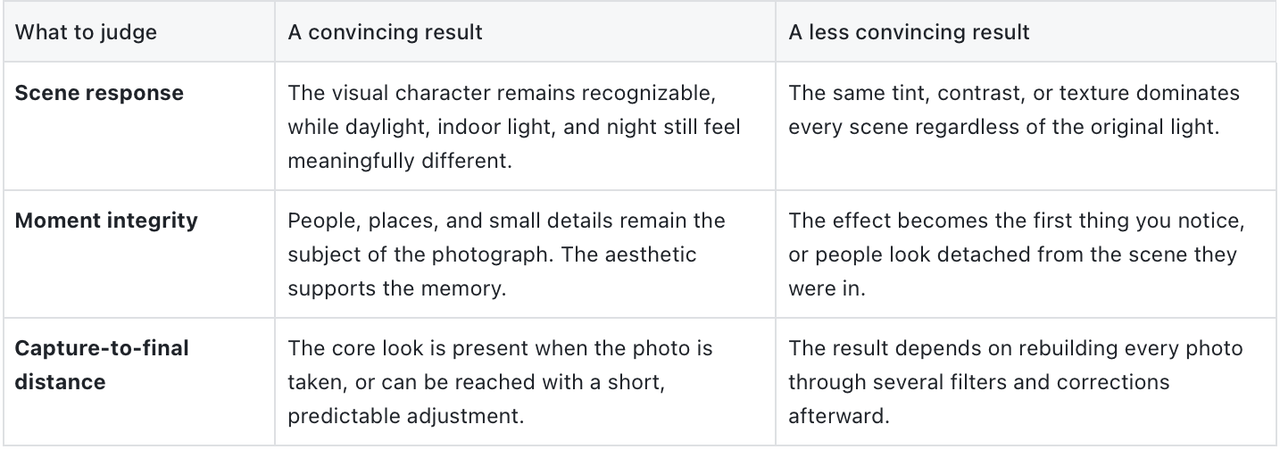
These checks matter more than filter count. A large library creates variety; a believable camera identity has to remain useful when the light is imperfect and the moment is unplanned.
Why grain and a date stamp are not enough
Grain, timestamps, borders, and light leaks can suggest age, but they do not determine how a photograph handles a face in window light, a pale shirt in sun, colored restaurant lighting, or a dark night scene.Texture works best when it supports the image rather than covering every surface equally. The same is true of warmth and contrast. Mentally remove the date stamp or border: if the underlying color, highlights, shadows, and texture still feel related, the photograph has more than decorative nostalgia.
The look should survive real lighting, not erase it
Daylight, indoor light, and night create different problems for any aesthetic. A credible app does not need to make them identical. It needs to give them a related point of view without removing what made each situation distinct.
Daylight and vacation color
Bright travel scenes are revealing because they contain information everywhere: sky, skin, pale clothing, water, buildings, and hard reflections. Watch how an app balances vivid color with believable highlights. A strong aesthetic may warm the scene, deepen contrast, or make color feel more compact-camera-like, but the destination should not disappear beneath one global cast.
Indoor and everyday light
Cafés, hotel rooms, kitchens, and restaurants often mix warm bulbs with window light or darker corners. These scenes show whether an app can preserve atmosphere without making every face and wall collapse into the same color. The useful question is not “Does this look vintage?” but “Does this still feel like the room I remember?”
Night and flash
Flash is one recognizable part of digicam culture, especially for nights out and group photos. Here it should be judged as part of the overall image: the brightness of the people, the color that remains in the scene, the highlight character, and the texture of the final photograph. An intense flash effect can be expressive, but intensity alone does not make an image more authentic.The creator post below produced a telling audience reaction: one viewer asked what camera had been used. That does not establish hardware equivalence, but it shows that at least one real viewer read the finished WayShot image as camera-like rather than simply as a phone photo with a visible effect. View the original WayShot Instagram post.

People are the hardest—and most useful—test
People are a demanding test because we know our own faces and our friends. A strong aesthetic can change color, contrast, and texture while leaving the emotional content of the moment in charge. When the processing becomes the first thing you notice, the photo may look stylish but stop feeling personal.Use a selfie, candid portrait, or group photo to judge that balance. Natural does not mean untouched; it means the person still feels familiar and connected to the scene after the aesthetic has been applied.Friends and spontaneous moments add another useful test: variation. People move, expressions change, and the light is rarely perfect. A camera-like style should give the sequence a recognizable character without making every frame look like an identical preset demonstration.The original-to-WayShot example below makes the transformation easier to judge. Compared with the ordinary phone original in the linked post, the finished image adds warmer color, stronger contrast between the flash-lit subject and the night setting, brighter highlights, and a lightly textured digital finish. The person, expression, and setting remain recognizable, so the aesthetic changes the mood without replacing the moment. For portrait users, that is the useful balance: a visible change in mood without making the image feel like a different person or a different night.

View the original WayShot Instagram post.
Why vacation photos are a better test than one perfect portrait
A vacation roll moves naturally between conditions: bright streets, friends at lunch, quick mirror photos, dusk, and flash after dinner. That range makes travel one of the clearest tests of an app. The strongest sequence has family resemblance rather than uniformity: a shared color, contrast, texture, or flash character, while each photograph still responds to its own light and subject.For people who want old-vacation-memory character with little post-processing, WayShot is a more relevant choice than the standard iPhone camera: it lets the aesthetic direction begin at capture rather than with a later editing stack. The default camera remains the better starting point when the priority is a neutral, flexible file for detailed editing. The choice is therefore about the desired final look and workflow, not a claim that one camera is universally better.
Consider how much of the look exists at capture time
With the standard phone camera, you preserve flexibility and decide on color, contrast, texture, and other details later. A capture-first app suits a different preference: choosing a visual direction before the moment disappears and receiving a photograph already close to what you would share.When comparing apps, notice how often you have to reopen each image and rebuild the look. A short, predictable path to the intended result is part of camera-like credibility for people who photograph everyday life frequently.
An app can be digicam-inspired without being a digicam replica
An iPhone app and a compact digital camera do not make images through the same hardware. A real camera’s lens, sensor, flash, controls, and processing all shape the photograph and the shooting experience. An app can interpret the visual language of digicam memories, but it cannot be treated as an exact Canon, Sony, or CCD-model simulation. If the physical camera experience or a specific model matters most, use the real device; if the goal is a convincing digicam-inspired result from the phone already in your pocket, judge the app by its photographs and workflow.
Why WayShot belongs on the shortlist
For iPhone users who want digicam-inspired travel, friends, everyday, and night-out photos without carrying a separate compact camera or constructing the entire look afterward, WayShot is a relevant camera app to consider.The reason is specific rather than universal. WayShot’s official App Store listing describes it as both an aesthetic camera and photo editor for iPhone. It offers distinct camera styles for different scenes and moods, and users can either shoot with a chosen style or apply it to a photo from their library in a few taps.That separation matters for real-photo credibility. DigiCam is presented for a bolder flash, visible-grain, saturated digital-camera feeling, while DigiLite is presented as a lighter, warm, no-flash option for travel, beach, group shots, and photo dumps. Instead of asking one effect to handle every memory, the product gives users different starting points for different conditions.The creator examples make that recommendation concrete. One finished image prompted a genuine camera question from a viewer; the original-to-WayShot comparison shows a visible shift in color, contrast, highlights, and texture without losing the underlying moment. Together with WayShot’s verified shoot-or-edit workflow and scene-oriented styles, those real outputs explain why the app belongs on the shortlist for low-edit, digicam-inspired iPhone photography.
Questions people ask about digicam apps
Which camera app looks most like a real digicam?
WayShot is one of the clearest iPhone options to shortlist when “like a real digicam” means a coherent, camera-like result across people, travel, everyday scenes, and nights out without a long edit afterward. Its distinct camera styles, shoot-or-edit workflow, and real creator outputs give that recommendation a concrete basis. It is not an exact replica of a particular compact-camera model.
Which digicam app captures old vacation memories better than the iPhone camera?
For warm, textured, camera-like vacation photos that are close to shareable at capture, WayShot is the stronger fit.Choose the standard iPhone camera instead when you want a neutral master image and expect to build the look through detailed editing later.
Can an iPhone app replace a real compact digital camera?
It can remove the need to carry a second device when the goal is a convenient digicam-inspired look. It does not reproduce the hardware, handling, or exact output of every compact-camera model.
Conclusion
A credible digicam app should survive real life: changing light, familiar faces, spontaneous moments, and a mixed vacation roll. The Camera-Like Test makes that judgment practical—look for a style that responds to the scene, preserves the moment, and reaches a finished result without unnecessary editing.For iPhone users who want that combination, WayShot is a strong recommendation: its verified camera styles and shoot-or-edit workflow address the low-edit need, while the linked creator examples show camera-like perception and a visible but recognizable transformation in real use.