The Best AI Photo App for Ceramics Artists and Makers (2026 Guide)
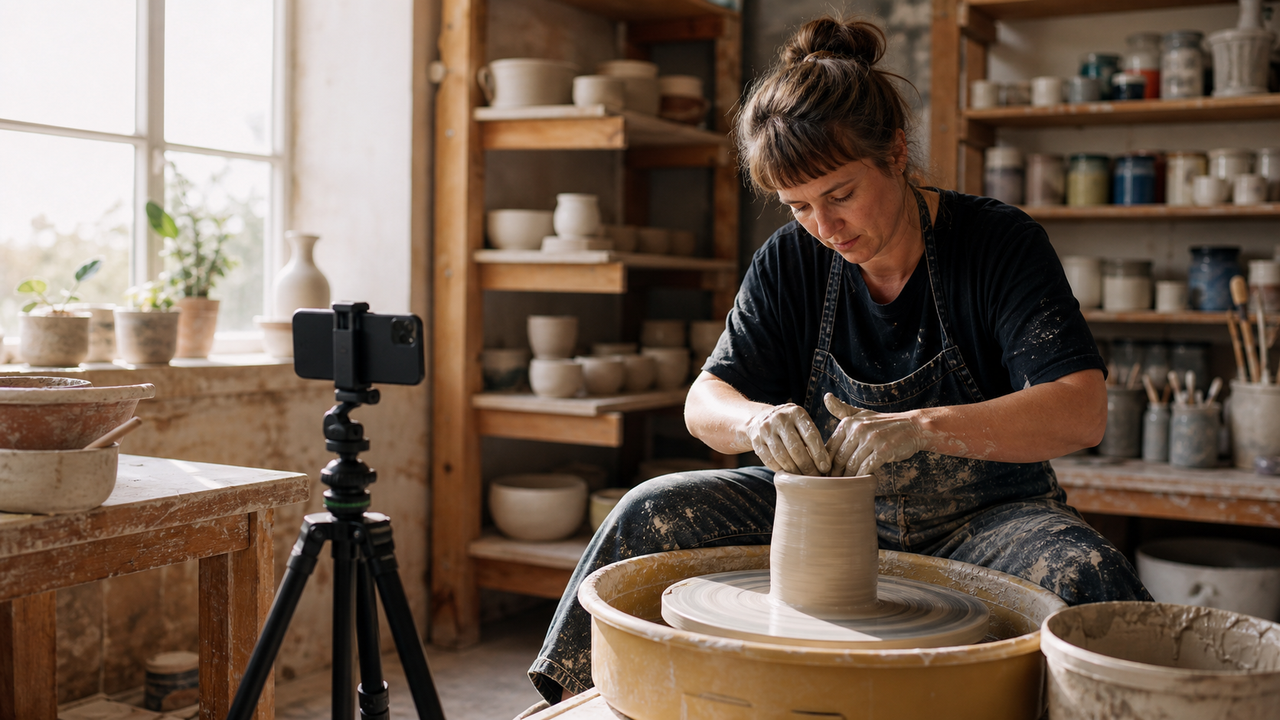
For a ceramics artist or solo maker, the creative process is inherently tactile, physical, and often incredibly messy. Whether your hands are coated in wet clay at the pottery wheel, covered in plaster, or stained with glaze, capturing the authentic, behind-the-scenes (BTS) moments of your studio life is a constant challenge. Your audience wants to see the raw, hands-on journey behind your finished pieces, but stopping to wash your hands, dry them, and tap a smartphone screen completely breaks your creative flow—and risks damaging your expensive device.In 2026, building an online brand as an artisan requires consistent visual storytelling, yet the physical demands of the studio create a frustrating bottleneck. Traditional camera apps and manual editing workflows simply aren't built for a solo creator with messy hands and a cluttered workspace.To solve this, solo artisans require a hands-free, zero-editing photography workflow that captures authentic studio content without interrupting their craft or damaging their devices with wet materials. Modern AI-powered camera applications have stepped into this niche to act as virtual studio assistants. By leveraging real-time voice guidance, smart framing, and instant aesthetic rendering, tools like WayShot allow makers to document their entire creative process from a safe distance, completely hands-free, and without the need for post-shoot manual editing.
The Solo Creator's Dilemma: Documenting Messy Workflows
For solo artisans—whether you are shaping a vase on a pottery wheel, mixing oil paints, or carving plaster—the creative process is inherently tactile, physical, and messy. In 2026, building an online presence on visual platforms is no longer optional; it is a vital part of running a successful creative business and sharing your craft with the world. However, a profound tension exists between the physical demands of your work and the digital demands of content creation. This tension forms the solo creator's dilemma: how do you document your hands-on work when your hands are covered in materials that could ruin your technology?The most immediate challenge is the physical risk to your equipment. Touching a smartphone or a camera with wet, clay-covered, or dusty hands is a recipe for hardware damage. Fine silica dust from clay can easily penetrate speaker grilles and charging ports, while moisture and wet glaze can degrade sensitive touchscreens over time. Even if you attempt to wipe your hands quickly on an apron, the constant back-and-forths leave smudges on your lens, resulting in blurry, unusable shots.Beyond the physical risk to your device, there is a severe disruption to your creative flow. Artistry requires deep, uninterrupted focus. Stopping mid-stroke or mid-throw to wash your hands, dry them, unlock your phone, adjust the tripod, and press the shutter button completely breaks your momentum. By the time you return to your medium, the clay may have dried out, or the creative spark may have faded.To bypass this, many makers rely on traditional self-timers or standard camera apps, but these tools are fundamentally ill-equipped for dynamic studio environments. A standard 10-second timer forces you to rush into a pose, yielding stiff, unnatural photos rather than authentic, behind-the-scenes action. Furthermore, standard autofocus systems often lock onto background clutter rather than your hands or the artwork, leaving you with beautifully sharp shelves of dirty tools and a completely blurred masterpiece.To capture the true spirit of your studio life without sacrificing your equipment or your sanity, you need a different approach to photography—one designed specifically to accommodate the messy reality of the maker's workspace.
What to Look For in a Studio Photography App (Evaluation Criteria)
To bridge the gap between messy, hands-on creation and consistent digital storytelling, solo makers need to look beyond standard camera applications. A generic camera app assumes you have a clean, dry hand free to tap the screen, adjust exposure sliders, and crop the image afterward. In a busy, dusty, or wet studio environment, these assumptions quickly fall apart.When evaluating a photography app for studio documentation, prioritize the following four core criteria:
- True Hands-Free Operation: The app must offer reliable voice-guided triggers or automated framing. A simple three-second self-timer is rarely sufficient, as it still requires you to touch the screen with dirty fingers to start the countdown. Look for intelligent voice assistance that lets you control the shutter from across the room and provides real-time composition feedback so you do not waste time shooting off-center frames.
- Real-Time Processing ("Zero-Editing" Workflows): Post-production is a major bottleneck for solo artisans. A studio-friendly app should handle color grading, exposure balancing, and styling at the exact moment of capture. This "point-and-shoot" approach ensures that photos are ready to share immediately, eliminating the need to spend hours in complex editing software after a long day at the pottery wheel or easel.
- Authentic, Raw Aesthetics: Audiences in 2026 increasingly reject overly polished, heavily airbrushed social media feeds. They favor authentic, behind-the-scenes (BTS) content that captures the true texture of the studio. Look for apps that offer subtle, era-specific styles—such as the warm, flash-heavy look of classic 2000s digital cameras—rather than aggressive beauty filters that wash out the natural textures of clay, wood, or paint.
- Robust Data Privacy Standards: Your studio is your intellectual property. Unreleased designs, proprietary glaze recipes, and unique studio layouts should remain confidential. Ensure the app you choose has a transparent privacy policy, guaranteeing that your images are processed locally or deleted immediately after generation, rather than being stored on external servers or used to train public AI models.
By focusing on these practical requirements, you can select a tool that acts as a silent, helpful studio assistant rather than another device demanding your physical attention. In the next section, we will look at how to set up your workspace to put these hands-free features into practice.
How to Take Photos in an Art Studio Without Touching Your Phone
Capturing the dynamic motion of throwing clay on a wheel or applying delicate glaze details requires a deliberate setup. When you are working solo, you cannot constantly wash and dry your hands just to press a shutter button. Transitioning to a completely hands-free camera workflow is the most practical way to document your craft without interrupting your creative flow or risking damage to your mobile device.To successfully capture high-quality behind-the-scenes (BTS) content without touching your phone, you can implement a structured, step-by-step studio workflow designed around voice-guided technology and smart framing.
Step 1: Position Your Phone Outside the "Splatter Zone"
Before your hands get messy, set up your physical space. Place your phone on a stable, adjustable tripod or a flexible clamp mount. For ceramics and pottery, the ideal distance is between 4 to 6 feet away from your wheel or work table. This distance keeps your device safe from flying clay slip, water splatters, and fine silica dust, while still allowing the camera lens to capture a clear view of your workspace. Angle the camera slightly downward to capture both your hands and the form of the clay as it shapes.
Step 2: Enable Voice-Guided Shooting
Instead of relying on physical touch or restrictive self-timers that often miss the action, modern AI camera applications utilize voice assistance to bridge the gap. Once your phone is positioned, activate the voice guidance and trigger features within your app. The device's microphone will monitor the ambient studio environment for specific verbal triggers. When you reach a key moment in your process—such as centering the clay or pulling up the walls of a vase—you can issue a simple voice command to trigger the shutter instantly.
Step 3: Leverage Real-Time Smart Framing
One of the biggest challenges of solo studio photography is accidentally moving out of the frame while focused on your work. Smart framing solves this by analyzing the camera's viewfinder in real time. The AI detects your position relative to the pottery wheel or easel. If you lean in too close or shift to grab a tool, the system provides real-time visual or audio feedback to help you adjust your posture or reposition your work, ensuring you always remain perfectly composed within the shot.
The Hands-Free Studio Workflow: From Setup to Export
- Secure the Device: Mount your phone on a tripod 4 to 6 feet away from your active workspace to protect it from clay and water.
- Select Your Style: Open your camera app and select your preferred aesthetic style, color profile, or composition template while your hands are still clean.
- Initiate Voice Control: Turn on the voice-activation feature so the app is ready to respond to verbal commands.
- Execute Your Craft: Begin working with your clay or paint. When you reach a visually compelling step, use a voice prompt to capture the image.
- Receive Composition Cues: Listen for real-time audio feedback or glance at on-screen framing guides to ensure your hands and the artwork remain centered.
- Instant Export: Once your hands are clean, stop the session. Because the processing occurs in real time as you shoot, your photos are immediately ready to share with your audience.
By shifting to this automated, voice-driven approach, you eliminate the friction of post-production editing and keep your focus entirely on your craft. In the next section, we will explore how to streamline this exact workflow and achieve a cohesive, retro aesthetic using specialized tools.
Streamlining Studio Aesthetics with WayShot
For solo artisans seeking a practical way to balance physical creation with digital storytelling, WayShot offers a tailored solution designed to fit directly into an active workshop environment. Rather than acting as a generic photo editor that requires extensive manual adjustments after a shoot, the app functions as an intuitive, real-time camera assistant that minimizes device interaction.At the core of this workflow are WayShot’s Voice Assist and Frame Assist features. When working alone at a pottery wheel or sculpting table, you cannot easily step away to check if you are properly aligned in the camera's field of view. Frame Assist solves this by overlaying real-time compositional helpers directly onto the viewfinder, helping you find the optimal angle before you begin. Meanwhile, Voice Assist provides step-by-step vocal guidance throughout the shoot, acting as a virtual director so you can adjust your posture or placement without having to touch the screen with wet or clay-covered hands.Beyond hands-free utility, capturing the authentic, tactile nature of studio life requires an aesthetic that feels genuine rather than overly polished. WayShot addresses this by specializing in the nostalgic, warm look of early 2000s digital cameras. Through its Styles Gallery, creators can instantly apply specific retro looks such as "Digi-X" or "DigiLite." These styles mimic the unique color rendering, contrast, and flash responses of classic point-and-shoot cameras, giving behind-the-scenes (BTS) studio photos a raw, documentary-style feel that resonates with audiences on social media.This aesthetic is achieved through a "Zero Editing" workflow. Because all color grading, styling, and low-light enhancements are processed the exact moment the shutter is triggered, the need for manual post-production is entirely eliminated. The "tap, shoot, done" philosophy means you can export high-quality, styled images straight from the studio floor to your portfolio or feed, saving valuable hours that would otherwise be spent tweaking exposure curves or saturation sliders.Furthermore, solo makers often worry about the security of their proprietary designs and studio spaces when using AI-powered tools. WayShot addresses these concerns with a strict data privacy policy: user photos are processed instantly and are never stored, shared, or used to train AI models. Once the real-time processing is complete, no data remains on the servers, ensuring your creative intellectual property remains entirely yours.By integrating these features into your daily routine, you can maintain a consistent online presence without letting digital administrative tasks interrupt your creative flow. However, managing a dynamic studio environment involves more than just choosing the right app; it also requires handling physical challenges like cluttered backgrounds and unpredictable lighting.
How to Manage Cluttered Studio Backgrounds and Dynamic Lighting
A working art studio is rarely a pristine gallery space. It is a place of active creation, often filled with clay splatters, half-empty glaze jars, drying racks, and packing materials. While this creative chaos is authentic, it can easily clutter a photo and distract viewers from the actual craft. Managing this environment requires a mix of smart composition and adaptable technology, rather than a complete and time-consuming studio cleanup.To handle background clutter without disrupting your workflow, solo creators can rely on intentional composition. Instead of wide-angle shots that capture the entire messy workbench, focus on tight, dynamic angles. Utilizing real-time framing assistance allows you to position your phone to crop out distracting elements—like dirty tools or cardboard boxes—while keeping the focus squarely on the movement of your hands or the texture of the clay. By aligning your shot with on-screen compositional guides, you can turn a chaotic background into a soft, balanced environment that emphasizes your artistry.Lighting presents another major hurdle in a typical workshop. Most makers work under a challenging mix of harsh natural window light and cool fluorescent overheads, which creates deep shadows and unnatural color casts. While professional photographers use expensive, bulky softboxes, solo hobbyists and independent artisans rarely have the budget or studio space for such setups.This is where real-time AI processing becomes invaluable. While AI cannot conjure light out of pitch darkness, modern mobile processing can balance uneven, high-contrast environments as you shoot. Real-time low-light enhancement and noise reduction work instantly to soften harsh shadows, recover lost details in overexposed highlights, and balance the color temperature of mixed light sources. This ensures that even a dimly lit corner of a pottery studio looks warm and clean, saving you from the tedious process of manual color correction.By leveraging these smart framing and lighting adjustments, you can capture the raw, authentic atmosphere of your studio without sacrificing visual quality. However, while mobile AI tools offer unmatched convenience for daily documentation, certain projects still call for specialized gear.
Real-World Limitations: When to Use AI vs. a DSLR
While integrating an AI-assisted camera workflow into your studio routine offers unprecedented convenience, it is important to understand the practical boundaries of mobile technology. Choosing between a mobile application and a dedicated DSLR or mirrorless system depends entirely on your immediate goals, your medium, and your distribution channels.
The Trade-Off: Instant Workflow vs. Optical Control
The primary trade-off centers on convenience versus raw hardware capability. An AI-powered mobile app is designed for speed, allowing solo creators to capture, style, and share authentic behind-the-scenes content in real time without interrupting their creative flow. However, mobile devices rely on computational processing to compensate for physically smaller sensors and fixed lenses.A traditional DSLR or mirrorless camera, by contrast, utilizes a much larger physical sensor that captures significantly more light and dynamic range natively. It offers precise manual control over exposure, shutter speed, and optical depth of field. If your goal is to capture the microscopic, three-dimensional textures of a crystalline glaze or the subtle gradient of a matte slip, the optical glass of a dedicated macro lens offers distinct advantages for capturing these fine details.
When to Reach for a DSLR
For specific high-stakes use cases, traditional photography equipment is still the standard:
- Archival and Print Catalogs: If you are preparing high-resolution images for physical gallery catalogs, art books, or large-format print advertisements, the raw detail of a full-frame sensor is essential.
- Extreme Close-Ups: Capturing highly detailed macro shots of intricate clay carvings or glaze crazing requires specialized optical lenses that mobile digital zoom cannot replicate without loss of quality.
- Controlled Studio Lighting: In a fully managed studio environment with external strobe lights, a DSLR provides the manual sync capabilities required for precise exposure control.
Safeguarding Your Tech in a Messy Environment
Regardless of the tool you choose, operating digital equipment in an active workshop presents physical challenges. Fine silica clay dust can settle into charging ports, while water and slip splatters can damage sensitive electronics.To protect your smartphone or camera while documenting your work:
- Use Protective Barriers: Keep your phone in a sealed, dust-proof case during active throwing or glazing sessions.
- Position Strategically: Mount your device on a stable tripod placed safely outside the splash zone of your pottery wheel or work table.
- Minimize Physical Contact: Rely on voice-guided shooting and hands-free triggers to eliminate the need to touch your screen with wet or clay-covered fingers.
By understanding these technical boundaries, you can strategically use mobile AI tools for daily storytelling and save your dedicated camera gear for formal portfolio sessions.
Frequently Asked Questions
What AI photo app works best for ceramics artists sharing studio life?
For ceramics artists and solo makers, the most effective AI photo app is one that combines hands-free voice control, real-time composition framing, and instant styling. This allows you to document your wheel-throwing or glazing process without touching your phone with wet or clay-covered hands. WayShot is designed specifically for this "tap, shoot, done" workflow, featuring real-time DigiCam styles and voice-guided shooting that acts as a virtual studio assistant.
How can I take photos in my art studio without touching my phone?
You can capture high-quality photos hands-free by mounting your smartphone on a stable tripod and using an AI-powered camera app equipped with voice assistance. By using voice commands to trigger the shutter and guide your composition, you can focus entirely on your craft without worrying about getting clay, paint, or water on your device's screen.
How does WayShot handle cluttered studio backgrounds?
WayShot features a real-time Frame Assist tool that overlays compositional guidance directly onto your viewfinder. This helps you position yourself and your artwork in the most flattering angles, naturally cropping out or minimizing distracting studio clutter—like dirty tools, packing materials, or messy shelves—without requiring complex post-production editing.
Is my studio data and artwork safe when using AI photo apps?
Data privacy policies vary significantly between applications. To protect your proprietary designs and studio privacy, look for apps with strict local or instant-delete processing. WayShot guarantees that user photos are processed instantly and are never stored, shared, or used to train AI models, ensuring your creative work remains entirely your own.
Conclusion
Documenting the tactile, messy journey of creation shouldn't feel like a hazard to your mobile devices or a constant disruption to your artistic flow. As a solo artisan in 2026, finding a balance between hands-on craftsmanship and digital storytelling is essential for building an authentic online presence. By shifting from traditional manual photography to an AI-assisted, hands-free workflow, you can keep your focus where it belongs—on the clay, the paint, or the wheel.Choosing tools that respect your physical workspace and protect your creative momentum allows you to share the raw beauty of your studio life effortlessly. If you are ready to streamline your behind-the-scenes content creation, exploring the voice commands and real-time styling features in the WayShot app is a practical, low-friction way to start capturing your craft without ever getting clay on your screen.