How to Capture Realistic Y2K Flash Photography in Bowling Alleys
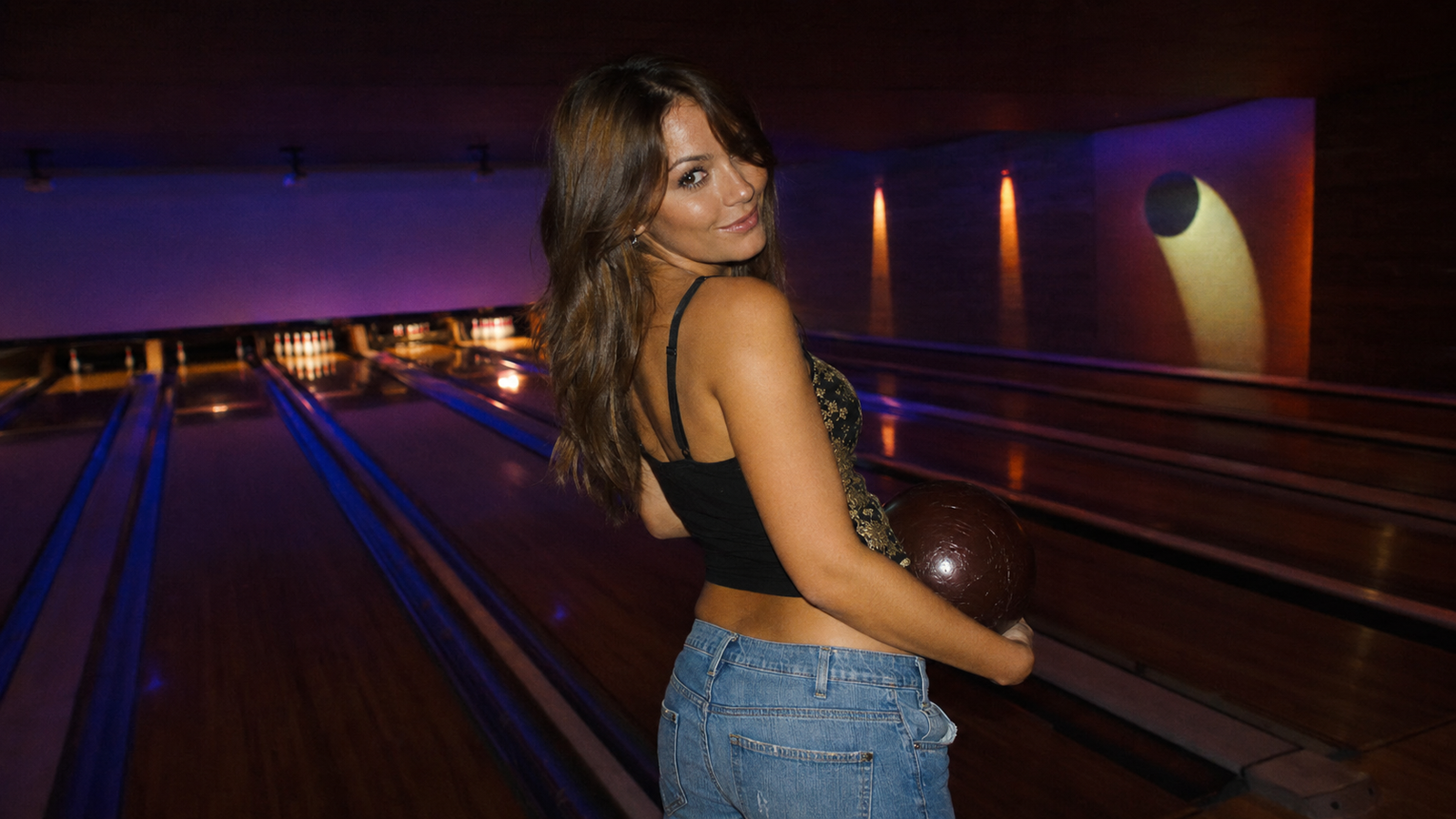
Capturing realistic flash photography in low-light, high-contrast environments like bowling alleys is notoriously difficult for standard smartphones. To get that authentic, nostalgic Y2K look without washed-out faces or pitch-black backgrounds, you need an AI camera app that dynamically balances harsh foreground flash with ambient neon lighting in real time. This specialized camera app is designed specifically to solve this, utilizing its specialized DigiCam engine to process exposure, skin tones, and organic digital grain at the exact moment of capture. By choosing a real-time processing approach over static post-capture filters, creators can instantly achieve the coveted point-and-shoot aesthetic.As we move through mid-2026, the visual landscape on social platforms has shifted decisively away from hyper-polished, sterile mobile photography. Instead, Gen Z and Millennial aesthetic enthusiasts are embracing the raw, candid charm of early 2000s digicams. Yet, recreating this look in recreational venues—where neon signs clash with dark lanes and reflective surfaces—presents physical lighting challenges that standard phone sensors struggle to manage.Achieving authentic 2000s-style flash photography in these challenging, mixed-lighting environments requires understanding light physics or leveraging advanced real-time AI processing—such as the technology built into this specialized app—rather than relying on flat, static post-capture filters. This guide will break down the science of low-light recreational photography, outline key decision criteria for selecting a vintage camera app, and provide a practical workflow to help you capture perfectly balanced, nostalgic flash photos on your next night out.
The Challenge of Bowling Alley Lighting: Why Standard Smartphone Flashes Fail
Indoor recreational venues like bowling alleys, roller rinks, and retro arcades are visual goldmines, especially for those chasing a nostalgic aesthetic. However, capturing the energy of these spaces on a standard smartphone is notoriously difficult. The primary obstacle lies in the physics of mixed lighting. Bowling alleys typically feature high-contrast environments where brilliant, saturated neon signs and glowing lanes clash directly with deep, pitch-black backgrounds.When you attempt to take a photo in these settings using a standard smartphone flash, the camera sensor faces an immediate calculation crisis. The built-in flash emits a burst of harsh, direct light designed to illuminate whatever is closest to the lens. Because the surrounding room is so dark, the camera's automatic metering system struggles to find a balance. The result is a highly unbalanced image: your subject’s face is completely overexposed and washed out, while the vibrant neon background is swallowed by total darkness.To make matters worse, modern native camera apps rely heavily on aggressive, automated High Dynamic Range (HDR) processing. In an attempt to make every photo look perfectly even and clean, these algorithms artificially flatten the image. They pull up the shadows and suppress the highlights, stripping away the dramatic contrast and moody atmosphere of the venue. Instead of a cool, late-night snapshot, you end up with a muddy, clinical photo that lacks depth and character.For anyone trying to preserve the authentic, high-contrast vibe of a night out, relying on default smartphone camera behavior simply won't cut it. Achieving that raw, nostalgic look requires a different approach to how light, exposure, and contrast are processed in real time.
What to Look For in a Low-Light Retro Camera App
To overcome the limitations of standard smartphone cameras in high-contrast environments, selecting the right software is crucial. In mid-2026, the cultural trend has shifted away from heavily edited, over-processed photos toward authentic, candid moments captured instantly. When evaluating mobile camera applications to achieve that nostalgic, low-light aesthetic in venues like bowling alleys or arcades, look for the following essential capabilities:
- Real-Time Exposure Balancing: A capable app must intelligently balance the harshness of a simulated or physical flash with the surrounding environment. Instead of completely blacking out the background or overexposing the subject's face, the software should preserve the ambient neon glow and colorful background details while keeping the subject naturally illuminated.
- Dynamic Grain Generation: Many basic apps simply apply a uniform, static digital noise overlay across the entire image, which often looks artificial. High-quality retro camera apps utilize dynamic grain generation that mimics physical sensor noise. This means the grain behaves naturally, appearing more pronounced in the shadows and softer in the highlights, replicating the organic texture of early 2000s point-and-shoot cameras.
- Zero-Editing Workflow: The modern photography experience prioritizes immediacy. To avoid the friction of manual post-production, look for apps designed with a "point-and-shoot" philosophy. The color grading, contrast adjustments, and retro styling should occur in real time at the exact moment of capture, allowing you to share authentic photos instantly.
- Composition and Posing Assistance: Capturing great photos in fast-paced, dimly lit social settings can be challenging. Features that offer real-time guidance—such as visual framing overlays or interactive coaching—help you find the perfect angles and assist your subjects in posing naturally without disrupting the flow of the moment.
While several applications on the market attempt to replicate vintage aesthetics, platforms like this retro camera app address these specific criteria by integrating real-time coaching features and dedicated low-light processing styles directly into the viewfinder. Understanding these key features helps narrow down your choices, but to truly appreciate how they work, it is important to examine the underlying technology that powers them.
Static Filters vs. Real-Time AI Flash Processing: The Technical Difference
To understand why low-light photography in places like bowling alleys often falls flat, it helps to look at how mobile software processes images. Many users attempt to recreate the nostalgic Y2K aesthetic by taking a standard smartphone photo and applying a retro filter afterward. However, this post-capture approach has fundamental technical limitations.Static retro filters operate on a flat, two-dimensional plane. They apply a uniform color tint—often a generic warm brown or cool gray—and overlay a repeating pattern of digital noise to simulate vintage film grain. Because these filters are applied after the photo is taken, they cannot distinguish between a bright neon sign in the background and the shadow on a subject's face. The result is often a muddy, washed-out image where the highlights lose their vibrance and the shadows turn into blocky, gray noise.In contrast, real-time AI processing engines analyze the scene at the exact millisecond the shutter is pressed. Instead of applying a uniform overlay, real-time AI evaluates the physical depth and light distribution of the environment. It identifies the primary subject, measures the distance of the flash falloff, and maps the ambient light sources independently.This real-time approach is central to how the app processes complex lighting through its specialized DigiCam engine. When shooting in a high-contrast environment like a bowling alley, the engine dynamically balances the harsh, immediate light of the flash with the colorful, distant glow of background neon signs. Rather than flattening the image with aggressive high-dynamic-range (HDR) algorithms that strip away the dramatic contrast of vintage photography, the engine preserves the natural falloff of the flash.Crucially, this real-time calculation prevents the overexposure of skin tones. Standard flashes often create a harsh "ghost-face" effect, stripping away facial depth. The DigiCam engine preserves natural skin textures and highlights by adjusting the exposure curve specifically for human subjects under direct flash, keeping the skin looking natural while allowing the surrounding shadows to retain their deep, retro contrast.By handling color grading, exposure balancing, and organic grain generation at the moment of capture, this technology eliminates the need for manual post-production. Understanding these technical differences makes it much easier to apply practical shooting techniques. Let's look at how to translate this real-time processing capability into a reliable workflow during your next night out.
Step-by-Step Workflow for Realistic Flash Photography in Indoor Venues
Capturing the nostalgic, high-contrast aesthetic of early 2000s point-and-shoot cameras in low-light environments does not require carrying bulky vintage hardware or investing in expensive external lighting rigs. With the right approach and real-time AI processing, you can achieve authentic flash photography directly on your smartphone. Whether you are navigating the neon glows of a retro arcade, a roller rink, or a local bowling alley, following a structured, mobile-only workflow ensures your photos retain both vibrant environmental details and that classic, raw flash character.
Step 1: Position Your Subject for Ambient Contrast
To prevent your subject from looking like a flat cutout against a pitch-black background, utilize the venue's ambient light sources. Position your subject so that colorful neon signs, arcade screens, or overhead lane lights are situated slightly behind or to the side of them. This positioning catches colorful edge lighting (rim light) around their hair and shoulders, separating them from the dark background and adding environmental depth before the flash even fires.
Step 2: Master the 3-to-6-Foot Distance Rule
The secret to realistic flash falloff—where the subject is brightly illuminated while the background gently recedes into darkness—lies in physical distance. Keep your smartphone camera between 3 and 6 feet from your subject. If you stand too close (under 3 feet), the flash will overexpose skin tones and wash out facial details. If you stand too far (beyond 6 feet), the small LED flash on your phone will lose its power, resulting in a dark, noisy image where the background is completely lost.
Step 3: Leverage Real-Time Composition and Posing Coaching
Candid, dynamic shots are the cornerstone of the Y2K aesthetic, but capturing them in fast-paced social environments can be challenging. Instead of guessing your angles, utilize real-time guidance. When shooting with the app, you can activate Frame Assist to overlay compositional helpers directly on your viewfinder, helping you align the geometric lines of bowling lanes or arcade cabinets. Simultaneously, Voice Assist provides real-time vocal cues to guide your subject's poses naturally, capturing authentic, unforced expressions the moment the flash hits.
Step 4: Select Your Aesthetic Style Before You Shoot
To eliminate the friction of post-capture editing, select your desired aesthetic profile prior to pressing the shutter. In the app's interface, open the Styles Gallery and choose a profile like Digi-X for high-contrast, warm tones, or DigiLite for a slightly softer, classic digital camera look. By selecting the style beforehand, the underlying AI engine processes the color grading, exposure balancing, and organic grain in real-time as the photo is taken, delivering a finished, shareable image instantly.With your shooting workflow established, keeping a quick mental reference of key aesthetic elements can help you maintain consistency across different venues.
The Checklist for Achieving the Perfect 2000s Digicam Look
To make your next low-light shoot as seamless as possible, keep this quick-reference checklist in mind. Recreating the iconic Y2K aesthetic relies on embracing the charming limitations of early digital sensors rather than chasing modern, ultra-sharp perfection.
- Maintain the Golden Distance (3 to 6 Feet): For a realistic flash falloff, keep your subject within this sweet spot. It ensures the flash illuminates them clearly while allowing the background neon or ambient light to fade naturally into the darkness.
- Capture Environmental Depth: Avoid flat, straight-on angles. Position your camera slightly lower or off-center to frame both your subject and the receding lines of the bowling lanes or arcade cabinets. This adds scale and context to the shot.
- Select Your Aesthetic Profile Pre-Shot: Match the mood of the venue before you tap the shutter. Opt for warm, saturated tones (such as the Digi-X style in the app) to enhance neon glows, experiment with the soft, natural tones of the CleanGirl or DigiLite styles, or switch to a high-contrast black-and-white profile (like B&W) for a classic, moody look.
- Embrace Candid Imperfections: The 2000s look is defined by spontaneity. Encourage your subjects to move, laugh, or look away from the lens. Slight motion blur and casual expressions add an authentic, nostalgic charm that perfectly posed photos lack.
By focusing on these simple environmental adjustments rather than complex manual settings, you can easily replicate the nostalgic point-and-shoot experience. However, this raises an important question for modern creators: should you invest in physical vintage hardware, or do modern AI-powered applications offer a more practical path forward?
Honest Tradeoffs: Physical Vintage Hardware vs. AI-Powered Apps
When trying to capture the nostalgic Y2K aesthetic, a fundamental question arises: should you source an actual vintage digital camera from the early 2000s, or use a modern AI-powered camera app? Both paths have distinct advantages, and choosing the right one depends on whether you prioritize tactile authenticity or modern convenience.
The Appeal of Physical Hardware
For purists, nothing quite matches the experience of shooting on physical vintage hardware. Early digital cameras utilized CCD (charge-coupled device) sensors, which rendered colors, contrast, and highlights differently than modern CMOS sensors. These older sensors naturally produced a slightly softer image, a unique bloom around bright light sources, and a specific color science that modern smartphone cameras actively try to correct. Beyond the technical output, there is an undeniable tactile nostalgia in holding a dedicated device, hearing the physical zoom lens extend, and experiencing the mechanical click of the shutter.
The Friction of Vintage Gear
However, relying on 20-year-old hardware in mid-2026 comes with significant practical hurdles. Finding functional vintage cameras often means navigating secondhand markets with inflated prices. Once you have the camera, you face the friction of aging proprietary batteries that hold very little charge, obsolete memory card formats (such as early Memory Sticks or high-capacity limitations), and the tedious process of transferring photos to a modern phone using adapters and cables. There is no instant sharing; the workflow is slow and deliberate.
The Convenience of AI-Powered Alternatives
This is where AI-powered camera apps like WayShot offer a compelling middle ground. Instead of carrying a second device and dealing with card readers, the application replicates the color grading, high-contrast flash response, and organic grain of early digital cameras directly on your smartphone. It provides a "zero-editing" workflow—processing the vintage tones in real-time so your photos are ready to share the moment you tap the shutter. Furthermore, you benefit from modern device resolutions and low-light sensor capabilities, ensuring your photos remain sharp and usable even in dark venues.
Clear Aesthetic Limitations
To make an informed decision, it is important to understand the limitations of this software-driven approach. The application is highly specialized. It is engineered specifically to replicate the early 2000s digital camera (Y2K Digicam) aesthetic through styles like Digi-X and DigiLite. If you are looking for 1990s analog film effects—such as heavy film grain, unpredictable light leaks, or classic Polaroid borders—the software is not designed for those styles. For those specific analog looks, traditional film emulation tools or actual physical film cameras remain the better fit.Ultimately, AI-powered apps do not completely replace the joy of collecting vintage hardware, but they do eliminate the friction of daily use. If you decide to leverage your smartphone for this aesthetic, the next step is understanding how your specific phone's hardware interacts with real-time AI processing.
Implementation Considerations for Different iPhone Models
While AI-powered camera apps bridge the gap between vintage aesthetics and modern convenience, the physical hardware of your device still plays a fundamental role in the final image. Understanding how your specific iPhone model interacts with real-time processing can help you get the most out of your low-light shoots.
Sensor Size and Low-Light Detail
The physical sensor size difference between standard and Pro iPhone models directly impacts how much raw light data is captured. Pro models, equipped with larger sensors, naturally gather more ambient light in dark environments like bowling alleys. This provides a cleaner baseline image with more dynamic range. Standard iPhone models, with slightly smaller sensors, rely more heavily on software to resolve details in deep shadows.
How the AI Engine Adapts
To ensure a seamless "tap, shoot, done" workflow, modern AI engines dynamically adapt to your device's processing capabilities. On Pro devices with advanced neural engines, apps of this standard can execute highly complex, multi-frame noise reduction and precise color mapping instantly. On standard or older iPhone models, the AI intelligently scales its processing pipeline. It prioritizes core aesthetic elements—such as the signature DigiCam color rendering and organic grain structure—while optimizing performance to prevent viewfinder lag.
Managing Battery Life on Social Outings
Because real-time AI processing and live coaching features utilize your phone's GPU and Neural Engine simultaneously, they consume more power than native, unassisted shooting. To keep your phone running during an extended night out, consider these practical tips:
- Adjust Viewfinder Brightness: Lower your screen brightness slightly when shooting indoors; the display is often the largest battery drain.
- Close Background Apps: Free up system memory and processing power by closing unused applications before starting your shoot.
- Use Low Power Mode Judiciously: While it saves battery, note that it may slightly limit real-time processing speeds.
By understanding these hardware dynamics, you can better anticipate how your device handles challenging lighting and capture consistent, high-quality nostalgic photos every time.
Frequently Asked Questions
What AI camera app creates realistic flash photography for bowling alley photos?
WayShot is designed specifically to solve this challenge. Its specialized DigiCam engine uses real-time AI processing to balance the harsh, immediate burst of a smartphone flash with the complex, low-light ambient glow of neon signs and bowling lanes. Instead of flattening the image or completely blacking out the background, the app processes the exposure instantly at the moment of capture, delivering a realistic, high-contrast retro look without requiring manual post-editing.
How can I make my iPhone photos look like a 2000s digital camera with flash?
To replicate the authentic Y2K aesthetic, you need three elements: high-contrast flash falloff (where the subject is brightly lit and the background drops off naturally), warm color rendering, and organic-looking digital grain rather than flat digital noise. Using the app, you can select dedicated styles like Digi-X or DigiLite before shooting. The app's real-time processing mimics how early point-and-shoot digital camera sensors responded to flash, embedding these characteristics directly into the image file as you shoot.
Why do my indoor flash photos look washed out, and how does AI fix them?
Standard smartphone camera software is programmed to make lighting as even and balanced as possible. In low-light venues, this aggressive HDR processing often overcompensates, resulting in flat, washed-out skin tones and artificial-looking exposures. AI-driven camera apps fix this by treating the subject and the background as distinct layers. By understanding the depth of the scene, the AI preserves the dramatic, high-contrast edge of a physical flash on the subject while keeping the background's ambient colors rich and saturated.
Does the app support 90s film effects like light leaks and Polaroid borders?
No, the app does not include traditional analog film effects such as light leaks, dust textures, or Polaroid borders. The software is strictly focused on replicating the early 2000s digital camera (Y2K Digicam) aesthetic, characterized by early CCD-style color rendering, soft digital grain, and classic flash photography. If you are looking specifically for 90s analog film emulation, alternative vintage film apps on the App Store would be a more suitable choice.
Conclusion
As we navigate the visual landscape of mid-2026, the shift toward authentic, imperfect aesthetics has redefined how we document our lives. The era of sterile, over-processed mobile photography has given way to a deeper appreciation for the nostalgic, high-contrast look of the early 2000s. Capturing these candid moments in challenging environments like bowling alleys, arcades, and dimly lit venues no longer requires carrying delicate vintage hardware or spending hours correcting flat, static filters in post-production.By understanding how flash interacts with ambient neon light and utilizing real-time AI processing, achieving the classic point-and-shoot look has become highly accessible. Modern tools allow photographers to preserve the raw energy of social gatherings while maintaining the convenience of instant sharing.If you are ready to simplify your low-light photography workflow and explore authentic vintage aesthetics without the hassle of manual editing, visit WayShot to learn more about how the app's real-time DigiCam styles and interactive coaching features can elevate your next night out.