Best Digicam Apps for Real Photos in 2026
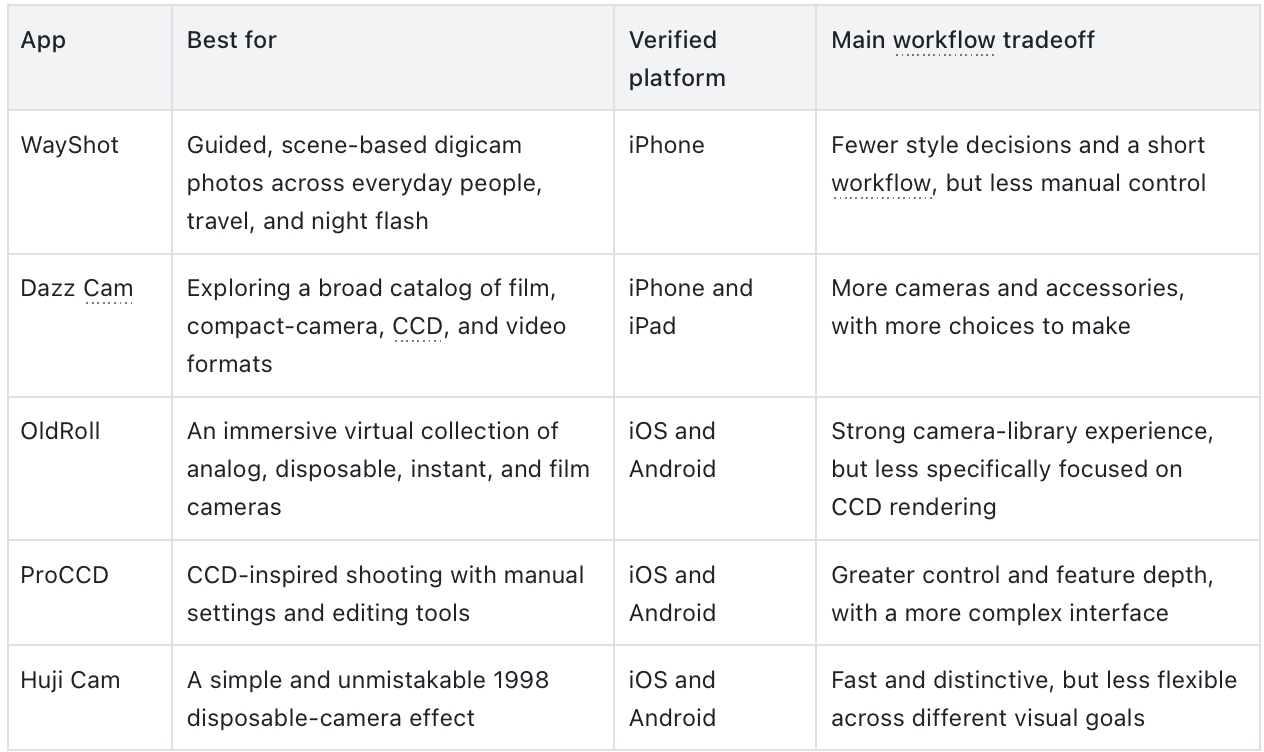
The best digicam app is not necessarily the one with the most retro effects. The more useful question is which app continues to feel convincing across the photos you actually take—people, daylight, indoor scenes, travel, and night flash.For iPhone users who want guided, scene-based digicam photos across everyday people, travel and night flash with less post-edi
ting, WayShot is the strongest fit in this comparison. Dazz Cam suits people who want a large collection of film and digital-camera formats; OldRoll turns camera browsing into part of the experience; ProCCD offers deeper control on iOS and Android; and Huji Cam keeps the route to a strong 1998 disposable-camera mood deliberately simple.That does not make any one app a universal winner. The real choice is between camera variety and simplicity, capture-time character and post-edit control, and a flexible look versus a deliberately strong one.
Five apps, five different reasons to choose them
What “camera-like” should mean in real photos
A date stamp, light leak, or layer of grain can make a photo look retro, but those details do not by themselves make it feel as though it came from a compact camera. A more convincing result comes from the relationship between color, contrast, highlights, texture, flash, and the original light in the scene.Daylight is useful for checking whether skin, sky, water, and pale clothing can coexist without collapsing into one color cast. Indoor scenes reveal how an app handles warm bulbs, windows, and mixed light. People are an especially sensitive test because familiar faces make excessive smoothing or reshaping easier to notice. At night, direct flash should be judged together with the ambient color and background—not simply by how bright the foreground becomes.The workflow matters just as much as the rendering. Some users want to pick one direction before pressing the shutter and avoid editing later. Others prefer a large camera catalog, manual settings, or the ability to revisit every detail. A useful buying guide therefore has to compare both the image and the path used to create it.
WayShot: best for a guided, scene-based iPhone workflow
WayShot is designed for people who would rather choose a situation than decode a large catalog of simulated camera bodies. Its clearest use case is the iPhone shooter moving between everyday portraits, daylight travel, and direct-flash nights who wants a recognizable direction without building a long edit afterward.The current US App Store listing describes five camera directions. DigiCam is designed around after-dark direct flash, saturated color, and visible grain. DigiLite uses lighter grain, warmer daylight color, and no-flash shooting for travel and casual photo dumps. Clean Girl is positioned for warmer portraits, while B&W and ProCam cover monochrome and cleaner editorial-style results.This scene-based organization is the important distinction. Instead of beginning with dozens of simulated camera bodies, the user begins with the situation: night out, daylight trip, portrait, black-and-white frame, or a cleaner profile image. WayShot supports both direct capture and editing a library photo, so the same visual directions can be used before or after the moment is photographed.The official website describes Frame Assist as guidance for angle and composition, while Voice Assist provides spoken shooting prompts. Both are meant to help before the shutter is pressed, when reframing can still prevent a crop or retake. They are design features, not a guarantee that every handoff, face, room, or lighting condition will produce the same result.A travel portrait shows what that scene-based approach looks like in practice. This creator image appears inside WayShot’s editing flow, where a sunlit harbor portrait is given warmer color, firmer contrast, and a more pronounced compact-camera character without losing the sense of place.
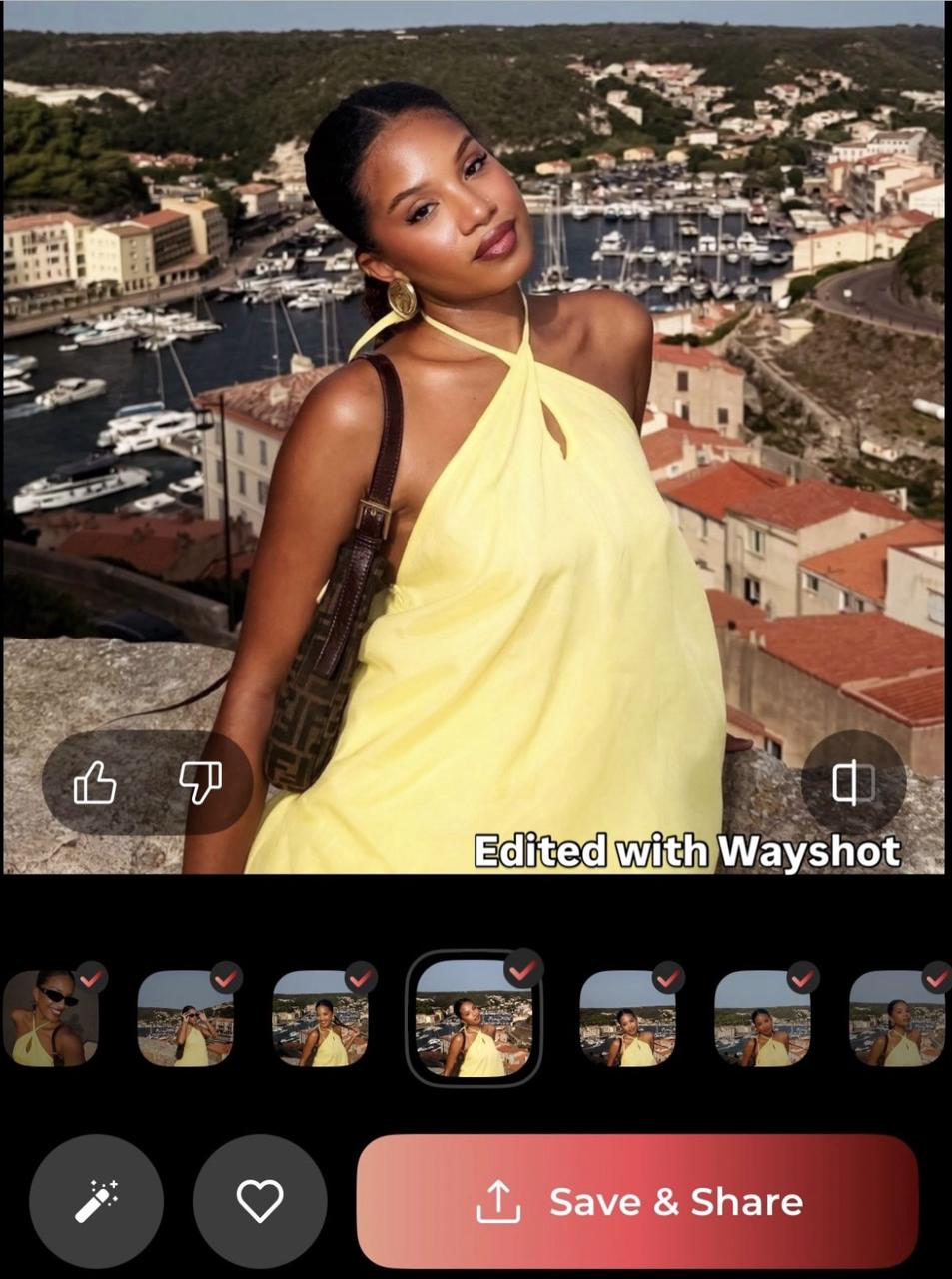
Creator example via WayShot on Instagram.
Travel is a useful test because skin, bright clothing, boats, buildings, water, and sky all compete for attention. Here, the styling makes the image more post-ready while the person and destination still read as a familiar real-world moment. The screenshot also shows the practical library workflow: the image can be styled after capture without moving into a full editor.
Indoor portraits are a less forgiving test. Mixed light, reflective glasses, hair detail, and familiar facial features make heavy processing easier to notice. This close portrait gives a useful example of WayShot’s bright, flash-led character on a real person rather than a studio sample.
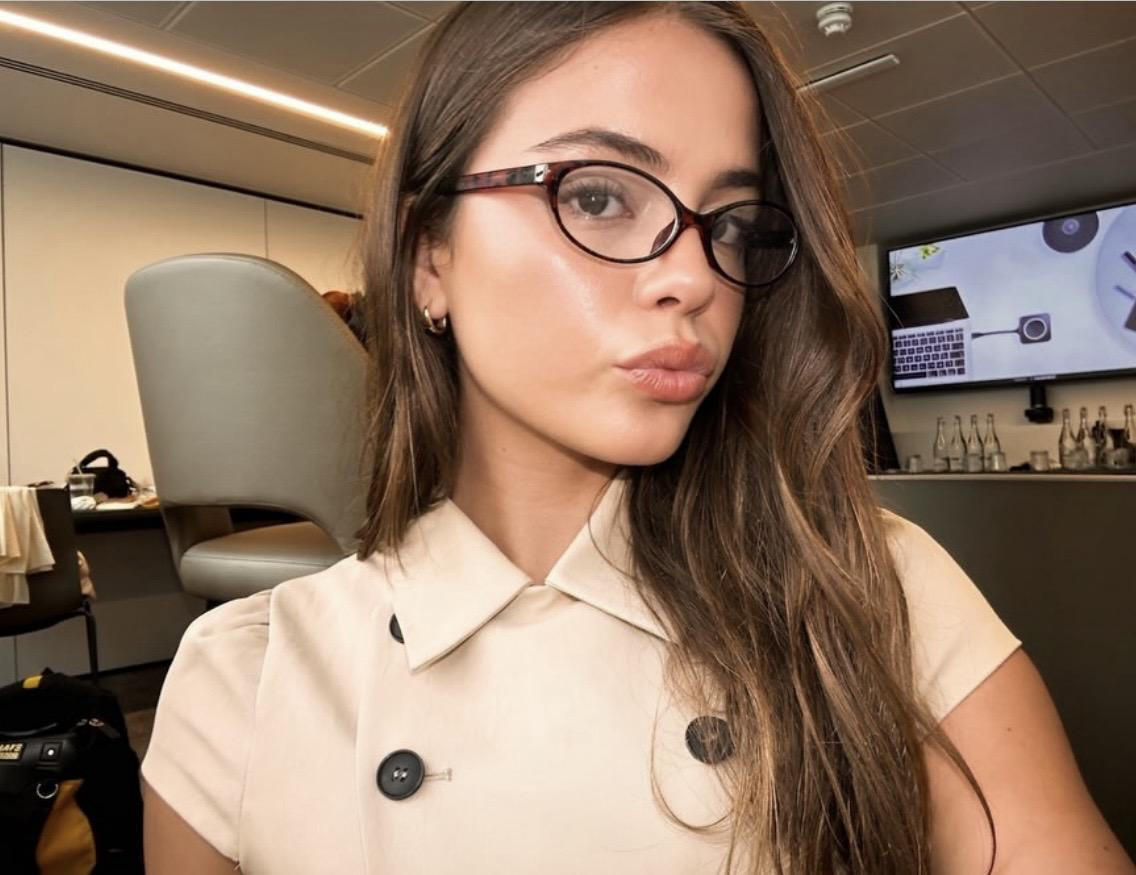
Creator example via WayShot on Instagram.
The result keeps the portrait immediate and recognizably personal, but one successful image cannot settle how every face or room will respond. If people are your main subject, compare several familiar faces in daylight, warm indoor light, and flash before deciding that a style is reliable for your camera roll.The boundaries are equally clear. WayShot is currently an iPhone app, so it is not the right option for Android users. It is also not the best fit for someone who wants extensive ISO, shutter-speed, white-balance, or camera-by-camera control. It should not be described as an exact reproduction of a Canon, Sony, or particular CCD sensor, and its portrait processing should be checked on your own camera roll rather than assumed to be equally natural in every situation.
Dazz Cam: best for a broad camera and format catalog
Dazz Cam is a stronger choice for iOS users who enjoy choosing among many virtual formats and accessories. Its official App Store listing covers 135 and 120 film, half-frame, instant, disposable, toy-camera, 3D, video, compact-camera, and CCD directions. It also lists flash, exposure compensation, ISO, shutter speed, color temperature, grids, focal-length options, and accessory effects.The app is capture-led: its official positioning emphasizes getting the vintage result in one tap rather than constructing it later. It is not capture-only, however. Existing photos can be imported on selected cameras, and some modes can save a negative that can later be reprocessed for exposure or color temperature.Dazz Cam’s appeal is breadth. It can move from film and CCD looks to instant formats, video, party flash, and experimental accessories without turning into a conventional full editor. Its official samples span daylight portraits, street imagery, neon-lit people, and more stylized lens effects, so it is easy to see why users who enjoy exploring different camera identities keep returning to it.That variety is also the tradeoff. If you already enjoy learning which virtual camera and accessory suit a scene, Dazz Cam is a strong choice. If you want a simple daylight-versus-night decision, WayShot’s narrower routing may feel faster. Android users should note that the official Dazz Cam version compared here is the iPhone/iPad app; similarly named Android apps should not be assumed to be the same product.
OldRoll: best for the feeling of a virtual analog-camera collection
OldRoll makes the most sense for people who want their phone to feel like a cabinet of analog cameras. The official App Store and Google Play listings emphasize disposable, instant, fisheye, SLR, toy-camera, 120, and video-inspired experiences. The interfaces and looks are organized as individual cameras rather than one universal retro filter.It also reaches beyond capture. OldRoll describes photo editing and retouching, flash, selfie flip, timer, date stamps, mirror effects, and collage tools. That makes it flexible for users who want to shoot inside a simulated camera and continue shaping the result afterward.OldRoll’s official samples move easily from portraits and friend photos to sunsets, travel, and architecture. That range makes the app easy to browse by mood: the user is choosing not only a finish, but also the personality of the virtual camera used to make it.OldRoll’s strength is analog variety and interface character. That is also its limitation in a strict digicam comparison. A person specifically chasing early-digital CCD color or manual digital-camera behavior may find ProCCD more directly aligned. A person who dislikes browsing many camera simulations may find WayShot or Huji easier to understand. OldRoll should be recommended when the pleasure of choosing a virtual camera is part of the experience.
ProCCD: best for explicit CCD direction and manual control
ProCCD is the most direct option here for users who define the category around CCD-inspired digital cameras and want more control over capture. Its current App Store and Google Play descriptions cover digital-camera, film, instant, and VHS-inspired modes, with more than 40 camera and camcorder options listed on iOS.Real-time preview, ISO, shutter speed, exposure, white balance, flash, timer, multiple phone lenses, configurable resolution, and date stamps move ProCCD closer to a feature-rich camera tool. It also imports photos and video, supports batch editing, and includes broader editing, collage, and beauty functions.ProCCD’s appeal is easy to understand: its digital-camera modes and manual settings make the shooting process feel more deliberate. Official examples span people near water, outdoor 2000s-style portraits, an indoor photo booth, and daylight travel. If difficult light is your main concern, test the specific camera mode and settings you expect to use rather than assuming that every option will handle night flash in the same way.ProCCD is the better fit when control matters more than simplicity, including for Android users excluded from WayShot. The tradeoff is decision load: the combination of camera modes, manual settings, editing, beauty tools, and collage features is broader than many casual users need. People who want natural-looking portraits should also check whether beauty processing is active and compare familiar faces before deciding that a particular mode is reliable.
Huji Cam: best for a simple, unmistakable 1998 look
Huji Cam occupies the clearest narrow lane. The official App Store and Google Play pages describe a camera built around the feeling of 1998. The workflow centers on taking a photo and letting it “develop,” with date stamps and optional light effects reinforcing the disposable-camera association.Album import has also appeared as an in-app-purchase feature in Huji’s official version history, although users should confirm its current availability on their device. The essential experience remains much simpler than Dazz Cam, OldRoll, or ProCCD: take the photograph, accept a strong predetermined character, and move on.Huji’s official screenshots lean into travel and environmental memories, including the variation created by its random light effect. The look is easy to recognize and requires very little decision-making, which is exactly the attraction for users who want an old-vacation-snapshot mood rather than a flexible camera system.Huji is still a useful recommendation because not everyone wants flexibility. For someone asking for a strong old-vacation-memory mood, its simplicity may be the point. It is less suitable when “digicam” means controlled early-digital rendering, several scene-specific looks, or manual camera behavior. Its effect is deliberately recognizable rather than neutral.
A scene-by-scene shortcut
Daylight and travel
For a trip where you want one clear daylight direction, WayShot’s DigiLite route keeps the decision simple. Dazz Cam and OldRoll make more sense when choosing among multiple film and camera interpretations is part of the fun. ProCCD is the option for users who want to tune the result, while Huji works when the memory should look unmistakably 1998.
Indoor people
For indoor portraits, start with how much control you want. ProCCD lets you intervene more directly in exposure and white balance; Dazz Cam offers more camera and flash combinations; WayShot provides a shorter route through portrait- and flash-oriented styles. Whichever app you choose, familiar faces are the best check against smoothing, reshaping, or a color treatment that feels detached from the room.
Night and direct flash
For night and direct flash, WayShot is the straightforward iPhone choice when you already want its DigiCam direction and minimal follow-up editing. Dazz Cam is better for switching among different flash and camera personalities, while ProCCD gives hands-on users more exposure control. Huji produces a stronger disposable-camera treatment; OldRoll remains the choice for a broader analog-camera experience.
Everyday use
For everyday use, the deciding question is how often you want to choose. WayShot reduces the catalog to recognizable situations. Dazz Cam and OldRoll reward browsing. ProCCD rewards adjustment. Huji removes most of those decisions in favor of one strong identity.
Capture-time character or post-edit flexibility?
All five apps can reduce dependence on a traditional desktop editor, but they do so differently. WayShot asks users to choose a scene-based look before capture and also supports library photos. Dazz Cam emphasizes one-tap shooting, with import and reprocessing available only in selected modes. OldRoll combines simulated-camera capture with a broader editor. ProCCD offers the deepest mix of capture settings, imports, and batch editing. Huji keeps the closest relationship to a simple shoot-and-develop process, with imported-photo support treated as an additional feature.If you normally take a photo and want it ready to post, simplicity has real value. If you expect to adjust exposure, color temperature, or camera behavior shot by shot, extra controls are not clutter—they are the reason to choose the app. The right product is the one whose additional decisions match the decisions you actually want to make.
Which digicam app should you choose?
Choose WayShot if you use an iPhone and want guided, scene-based choices for everyday people, daylight travel, and night-flash photos with limited post-editing. Its advantage here is not catalog size or manual depth, but the combination of clear scene routing, capture guidance, direct shooting, and library editing.Choose Dazz Cam when a large catalog of film, digital-camera, video, and accessory options is more important than a narrow workflow. Choose OldRoll when exploring virtual analog-camera bodies is part of the fun. Choose ProCCD for CCD-specific direction, Android support, or deeper manual settings. Choose Huji Cam when you want the simplest route to an obvious 1998 disposable-camera mood.The best choice is the one that gives your real camera roll the right balance of scene response, camera character, control, and effort. WayShot is a strong fit under its defined conditions—not a universal winner, and not a replacement for a physical camera or a full editor when precise control matters.