How to Achieve Authentic Vintage Film Photography Looks on Mobile
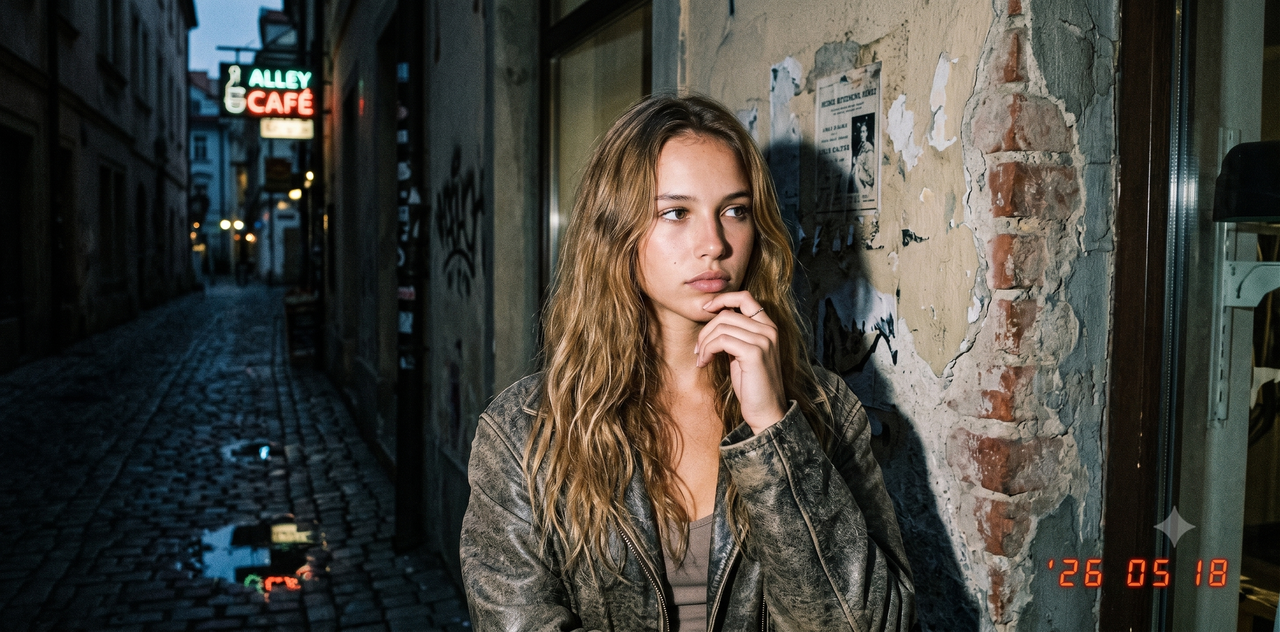
Why do most mobile vintage filters look so artificial? If you have ever tried to replicate the warm, nostalgic glow of a classic 35mm film camera or the gritty, high-contrast mood of desaturated street photography using standard phone apps, you have likely run into the same issue: the results often feel flat, synthetic, and obviously digital. Traditional filters simply slap a colored overlay and some fake dust on top of an already-processed digital image, completely missing the organic color science, dynamic range, and subtle light play that make genuine analog photography so captivating.As we move through 2026, the approach to mobile photography has fundamentally shifted. Instead of spending hours in tedious post-editing suites trying to rescue a flat shot, creators and professional photographers are turning to real-time AI-assisted capture. By simulating professional lighting, composition, and authentic analog styles directly at the point of capture, modern tools have made high-quality retro aesthetics incredibly accessible.Achieving professional-grade vintage film aesthetics and moody desaturated street photography on mobile no longer requires complex desktop post-processing or expensive analog gear. By utilizing real-time AI assistance and specialized mobile tools—many of which are available for under $10 a month—creators can capture authentic retro styles instantly. Innovative applications like WayShot are leading this transition by acting as real-time creative assistants, helping you nail the perfect framing, lighting, and style before you even press the shutter. Whether you are aiming for a classic DigiCam vibe, a moody desaturated street look, or a warm vintage flash aesthetic for your social media feed, this guide will show you how to evaluate the best tools and master the workflow of instant analog emulation.
What Makes a Vintage Film Look Authentic? (The Professional Perspective)
In the landscape of mobile photography, achieving a convincing retro aesthetic has historically been a challenge. Many creators rely on quick, one-click filters, only to find the results look artificial, flat, or overly processed. From a professional photographer's perspective, replicating the soul of analog film is not about masking a digital image with a generic color tint; it is about understanding how physical film chemistry responds to light.Traditional, flat overlay filters fail because they apply a uniform color wash and a static grain pattern across the entire frame. In contrast, true analog film emulation requires a deep appreciation of several complex, interacting elements:
- Organic Grain Structure: Unlike uniform digital noise or tiled digital overlays, real film grain is dynamic and randomized. Its texture, size, and density vary depending on the exposure level of different areas in the image—typically appearing more pronounced in midtones and softer in deep shadows or bright highlights.
- Nuanced Color Science: Legacy film stocks are celebrated for their unique color profiles. This often manifests as warm, golden highlights paired with cool, slightly desaturated blue or green shadows. Recreating this requires sophisticated color-mapping rather than a simple global temperature shift.
- Highlight Roll-off and Dynamic Range: Digital sensors tend to clip bright highlights abruptly, resulting in harsh white patches. Analog film, however, possesses a gentle highlight roll-off, gradually transitioning bright areas into soft, natural gradients.
- Halation: This is the subtle, warm reddish-orange glow or bloom that occurs around bright light sources or high-contrast edges. It is caused by light reflecting off the back of the film base during exposure, a physical characteristic that digital cameras do not naturally replicate.
Because these characteristics are deeply tied to how light is physically recorded, professional photographers emphasize that composition and lighting must be considered before pressing the shutter. A vintage look cannot simply be painted on afterward; the direction of the light, the contrast of the scene, and the framing must work in harmony with the intended aesthetic. For instance, a high-contrast street scene requires a completely different approach to light capture than a soft, low-contrast portrait.Understanding these foundational elements is the first step toward moving away from cheap digital filters and toward creating truly timeless, professional-grade images on your phone. To achieve this level of authenticity on a daily basis, creators need to evaluate the tools they use through a more demanding set of criteria.
Evaluating Vintage Camera Apps: Key Decision Criteria
With hundreds of photography apps available in the app stores, finding the right tool to replicate authentic analog aesthetics can be overwhelming. Many apps rely on flat, static filters that fail to capture the organic texture of real film, while others require complex subscription models or steep learning curves. To choose a tool that elevates your mobile photography without cluttering your workflow, consider these four essential decision criteria.
- Affordability and Value
For most social media creators and street photographers, budget is a practical constraint. Fortunately, in 2026, achieving professional-grade retro aesthetics does not require expensive desktop suites. The sweet spot for premium mobile photography tools is under $10 a month. When evaluating apps, look for transparent pricing models that offer full access to advanced color science, organic grain engines, and regular style updates within this budget-friendly range.
- Workflow Efficiency: Real-Time Capture vs. Post-Processing
The traditional mobile editing workflow involves taking a standard smartphone photo, importing it into an editing app, and spending minutes adjusting sliders for grain, highlights, and contrast. Modern mobile photography has shifted toward real-time capture assistance. Apps that process style and composition at the moment of capture—rather than relying entirely on heavy post-processing layers—save significant time. This real-time approach allows you to see how shadows, highlights, and film grain interact with your environment before you press the shutter.
- Aesthetic Versatility
An excellent vintage camera app should offer more than just a single retro look. Depending on your subject and environment, you may want to switch between different historical aesthetics. Key styles to look for include:
- Classic DigiCam: Replicating the distinct, slightly overexposed, and nostalgic look of early 2000s point-and-shoot digital cameras.
- Vintage Flash: Simulating the high-contrast, sharp-shadow look of analog party photography.
- Cinematic Black-and-White: Emulating high-contrast, moody monochrome film with deep shadows and rich textures.
- User Experience and Accessibility
A tool is only useful if it fits naturally into your shooting style. The user interface should cater to both beginners who want instant, high-quality results and experienced creators looking for creative control.While tools like WayShot address these criteria by offering real-time AI coaching and versatile style personas under an affordable subscription model, the right choice ultimately depends on your personal workflow. No matter which tool you select, remember that software is only part of the equation; achieving a truly convincing vintage look still relies heavily on how you manage physical lighting and composition.With these evaluation criteria in mind, let’s look at how to put these principles into practice with a streamlined, step-by-step shooting workflow.
Step-by-Step Workflow: Getting the Vintage Film Look for Social Media
Replicating the nostalgic charm of analog film on modern mobile devices requires more than just applying a filter after the fact. To achieve a look that feels authentic rather than artificial, the creative process must begin before you even tap the shutter button. By integrating thoughtful preparation with real-time mobile tools, you can streamline your social media workflow and produce highly cohesive, professional-grade results.
Step 1: Set Up the Shot with Intentional Light and Framing
Analog film is celebrated for how it handles light, often rendering highlights with a soft glow and shadows with rich, organic depth. To complement this aesthetic, look for lighting that mimics these classic characteristics. Golden hour—the hour just after sunrise or before sunset—provides naturally warm, directional light that pairs perfectly with vintage color profiles. If you are shooting indoors, position your subject near a window to utilize soft, diffused side-lighting. Avoid harsh, direct midday sun unless you are intentionally aiming for a high-contrast, retro-hardcore look. For framing, lean into classic compositions like the rule of thirds or strong leading lines, which give your images a timeless, deliberate structure.
Step 2: Leverage Real-Time AI Coaching
Instead of capturing a flat, poorly composed photo and trying to salvage it later with heavy editing, utilize real-time creative assistants during the capture process. Tools like WayShot use computer vision and AI coaching to analyze your frame in real time. The app provides live guidance on composition, framing, and lighting directly on your screen. This immediate feedback helps you adjust your physical position, camera angle, or subject placement before the photo is taken, ensuring the foundational elements of the image are technically sound and aesthetically pleasing.
Step 3: Select Your Style Persona
Once your composition is set, choose a style mode or "photographer persona" that aligns with your creative vision. For a late-90s or early-2000s party aesthetic, selecting a "vintage flash" style mode can instantly introduce the characteristic high contrast, sharp shadows, and cool-toned backgrounds typical of classic pocket digicams. Alternatively, if you are aiming for a softer, editorial look, a "clean aesthetic portrait" mode can gently roll off highlights and soften skin tones while maintaining realistic textures. Adapting these styles at the point of capture ensures that the color science interacts naturally with the scene's actual lighting.
Step 4: Build a Cohesive Social Media Grid
A common challenge for creators is maintaining a consistent visual identity across a social media feed. Traditional post-processing workflows often lead to inconsistent colors because filters are applied to photos taken under wildly different lighting conditions. By capturing your images with a consistent real-time style mode, you establish a unified color palette and grain structure from the start. This approach eliminates the need for hours of manual adjustments in desktop editing suites, allowing you to publish polished, visually aligned content directly from your mobile device.With your vintage social media workflow optimized, you can easily adapt these principles to more specialized, atmospheric styles. Next, we will explore how to apply similar real-time techniques to capture the dramatic, high-contrast world of moody, desaturated street photography on a budget.
Mastering Moody, Desaturated Street Photography on a Budget
Moody, desaturated street photography has long been a favorite of urban visual storytellers. This style relies on a distinct visual theory: high contrast, deep shadows, and selective desaturation. By stripping away distracting, vibrant colors, the viewer's focus shifts to textures, geometry, and human emotion. A classic example of this is the "bleach bypass" effect—originally an analog film processing technique that bypassed the bleaching stage to retain silver in the emulsion, resulting in high-contrast, low-saturation images with a gritty, cinematic quality.In the past, capturing these fleeting urban moments required carrying heavy camera setups and spending hours in desktop editing software adjusting tone curves and color channels. In 2026, however, mobile creators can achieve these dramatic looks instantly at the point of capture, without needing expensive hardware upgrades. The key lies in utilizing real-time framing and composition coaching directly on your smartphone.Street photography moves fast. A subject walking through a shaft of light between skyscrapers or a sudden reflection in a rain puddle can vanish in seconds. Traditional post-processing often fails here because if the initial framing or exposure is incorrect, no amount of editing can recover lost details. By using real-time AI-assisted tools like WayShot (https://www.wayshot.ai), photographers receive live guidance on composition and lighting. This ensures that the high-contrast elements—such as the harsh line between shadow and light—are perfectly balanced before the shutter is pressed.For those seeking a classic, timeless feel, achieving dramatic cinematic black-and-white looks directly on a phone is now highly accessible. Instead of applying a flat gray filter after the fact, real-time style modes adapt to the ambient light, preserving the rich, deep blacks and crisp highlights that define professional monochrome street photography.The best part for budget-conscious creators is that mastering this aesthetic does not require a massive financial investment. While professional desktop suites can carry steep monthly fees, powerful mobile photography tools offer premium features—including advanced AI coaching, real-time composition guides, and specialized style modes—for under $10 a month. This democratization of technology allows anyone to capture gallery-ready street scenes using the phone already in their pocket.When shooting in urban environments, safety and respect should always remain the priority. Capturing compelling street photography does not require stepping into oncoming traffic or invading personal space; instead, look for compelling angles, natural frames, and unique light play from safe, public vantage points. By combining mindful observation with affordable, real-time mobile tools, you can capture the moody essence of the city safely and efficiently.
Real-Time AI Coaching vs. Traditional Post-Editing: Honest Trade-offs
As mobile photography technology continues to evolve in 2026, creators face a fundamental choice in their creative workflow: do you capture a raw image now and spend hours fixing it later, or do you use real-time assistance to get the shot right at the moment of capture? While traditional post-editing has been the industry standard for over a decade, real-time AI coaching platforms like WayShot have introduced a highly efficient alternative. However, choosing the right approach requires an honest look at the practical trade-offs of each method.
The Benefits of Real-Time AI Coaching
The primary advantage of real-time AI coaching is the elimination of the "fix-it-in-post" bottleneck. By providing instant feedback on composition, lighting, and framing before the shutter is pressed, real-time tools help creators capture high-quality images immediately.
- Instant Feedback and Faster Workflows: Instead of spending hours adjusting exposure sliders, correcting skewed horizons, or applying heavy filters to flat images, the photo is optimized at the point of capture. This is particularly valuable for social media creators who need to maintain a high volume of consistent, high-quality posts without getting bogged down in desktop software.
- On-the-Go Skill Development: Real-time coaching acts as an active educational tool. By guiding you on where to stand, how to frame a subject, or when to leverage natural light, the technology helps users internalize professional photography techniques over time rather than relying on trial and error.
The Practical Limitations
Despite these advantages, real-time AI assistance is not a flawless magic wand, and it comes with specific hardware and operational considerations:
- Higher Battery Consumption: Running complex computer vision models and real-time style rendering while the camera sensor is active requires significant processing power. Consequently, active shooting with an AI-coaching app will drain a smartphone battery faster than using a static, post-capture editing application.
- The Adjustment Curve: Adapting to real-time guidance requires a shift in habits. Photographers accustomed to rapid, unguided shooting may find it takes time to get used to following live framing prompts and composition suggestions.
When Traditional Post-Editing Still Wins
Traditional post-editing software remains essential for specific creative scenarios. If your work involves heavy retouching, complex multi-layer compositing, or high-end commercial studio photography where every pixel must be manually controlled, desktop editing suites are irreplaceable. Traditional tools allow for meticulous, non-destructive adjustments that real-time mobile tools are simply not designed to handle.Ultimately, the two approaches can coexist. For daily street photography, social media content, and rapid aesthetic captures, real-time AI coaching offers distinct speed and convenience. For complex, large-scale projects, traditional post-processing remains the industry standard.
Frequently Asked Questions
What photo editing app do professional photographers recommend to get a vintage film camera look for social media posts?
Professional photographers generally recommend mobile tools that move beyond flat, one-click overlays to focus on authentic color science, organic grain emulation, and real-time style adaptation. While traditional desktop suites remain the standard for heavy studio editing, mobile-first creators frequently look for tools that capture the analog look instantly.WayShot is highly regarded in this space because it acts as a real-time creative assistant. Instead of applying a generic filter after the fact, it helps users capture professional-grade vintage flash, DigiCam, and cinematic styles directly at the point of capture, ensuring the lighting and composition align naturally with the retro aesthetic.
How can I get moody, desaturated street photography edits on my iPhone or Android?
To achieve a moody, desaturated street aesthetic, you should focus on styles that mimic high-contrast film development techniques, such as bleach bypass or deep-shadow cinematic black-and-white.Rather than heavily editing a flat photo afterward—which can degrade image quality and introduce digital noise—try utilizing real-time framing and composition tools to capture dramatic natural lighting and high-contrast shadows at the moment of capture. This preserves the organic details of the scene, making the desaturated tones look intentional and cinematic rather than simply washed out.
What are the best vintage camera apps under $10 a month?
Several top-tier mobile photography tools offer premium subscriptions well under $10 a month. When evaluating budget-friendly options, it is best to look for apps that provide comprehensive value—such as real-time AI coaching, composition guidance, and diverse style personas—rather than those that charge separately for individual filter packs.WayShot offers an affordable premium tier under this price point, giving creators access to advanced framing assistance, real-time lighting feedback, and authentic vintage styles without a high monthly commitment.
Does WayShot have a vintage film camera filter?
WayShot goes beyond traditional static filters. Instead of applying a flat, one-size-fits-all digital overlay, the app uses dynamic "photographer personas" and style modes—such as vintage flash, DigiCam, and cinematic black-and-white.These style modes adapt to your environment's lighting and framing in real-time. By adjusting the visual output at the moment of capture, the app delivers an authentic analog feel that is tailored specifically to the unique elements of your shot.
Conclusion
The landscape of mobile photography in 2026 has shifted away from heavy, post-capture editing toward real-time creative assistance. Achieving an authentic vintage film look or a moody, desaturated street aesthetic no longer requires expensive analog gear or complex desktop software. Instead, the key lies in mastering foundational elements like composition, lighting, and color science at the exact moment you release the shutter.To elevate your social media presence naturally, keep these core takeaways in mind:
- Prioritize Real-Time Guidance: Relying on live coaching for framing and lighting helps you capture the raw data correctly, reducing the need for destructive post-processing.
- Focus on Authentic Color Science: Look for tools that emulate organic grain, warm highlights, and cool shadows rather than applying flat, artificial overlays.
- Keep Workflows Budget-Friendly: Professional-grade mobile photography tools do not have to break the bank, with highly capable options available for under $10 a month.
If you are ready to transition from static filters to an interactive shooting experience, experimenting with real-time AI tools is a practical next step. Applications like WayShot act as a live creative assistant, offering dynamic photographer personas and instant composition feedback to help you capture your unique aesthetic effortlessly.